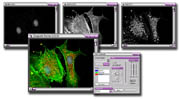
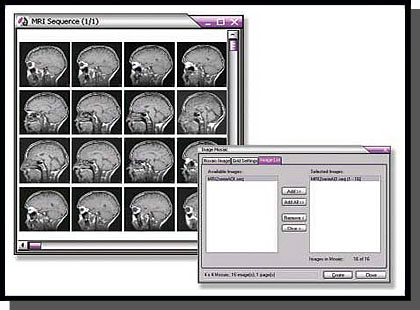
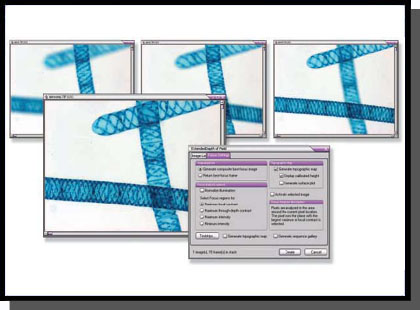
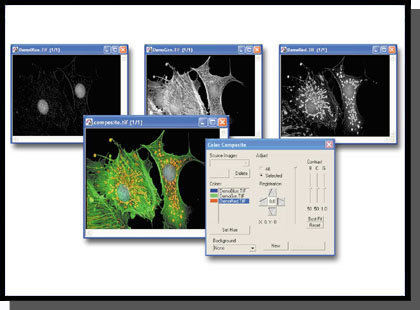
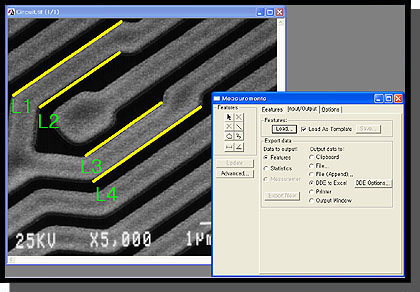
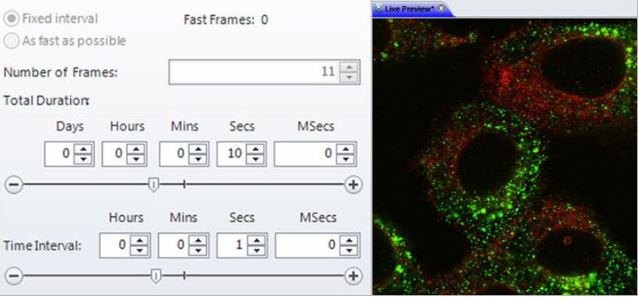
시간 간격으로 이미지를 획득하여 시간에 따른 표본 또는 재료의 변화를 조사합니다. 타임 랩스 이미지를 동영상으로 재생하여 움직임 및 기타 활동의 확인이 가능합니다.
시간변화에 따른 개체 이동변위 측정
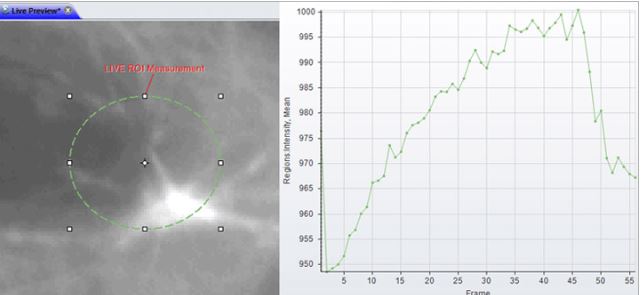
시간 변화에 따른 개체의 intensity 변화량 측정
Morphology
수동/ 자동 측정을 위한 다양한 필터를 사용하여 이미지 구조를 정확하게 분할합니다
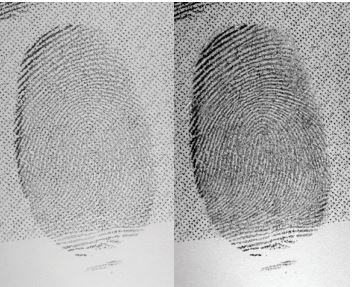
Filter and Enhance
노이즈를 필터링하고 이미지 디테일을 향상시키기 위해 다양한 강화필터와 에지 필터를 사용합니다,
Pseudo-color
Pseudo-color(의사 색상)을 사용하여 회색조 이미지에서 관심있는 부분을 강조 표시합니다. 일반적으로 주변과 구분하기 어려운 특정 강도를 시각적으로 강조하기 위해 사용합니다.
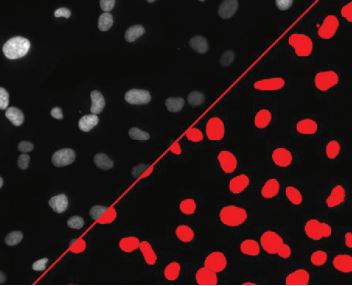
Count and Measure
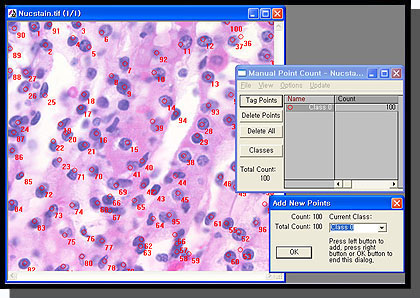
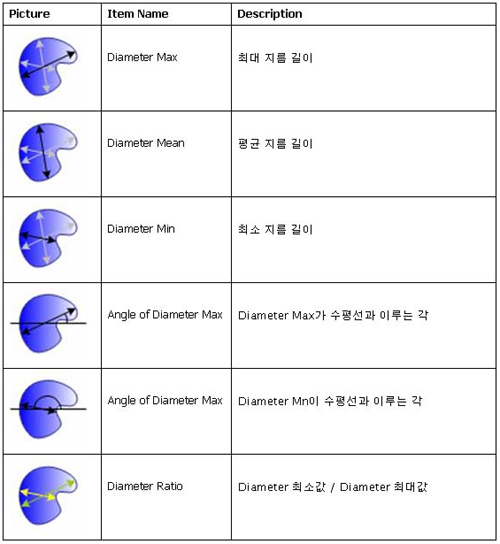
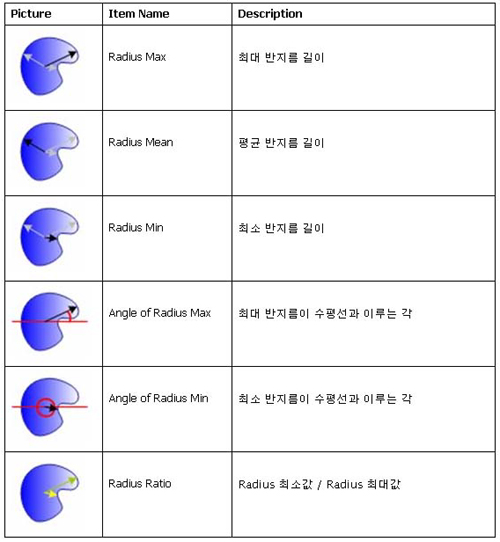
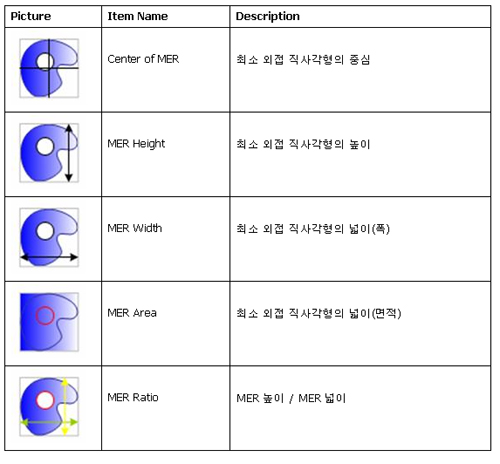
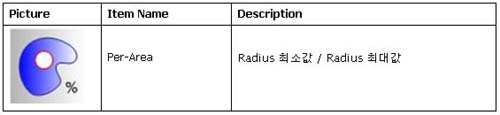
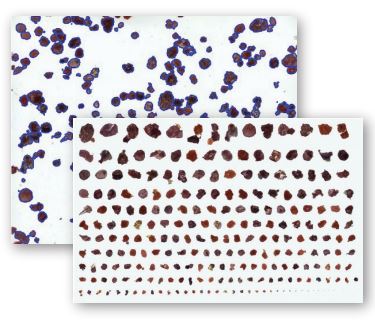
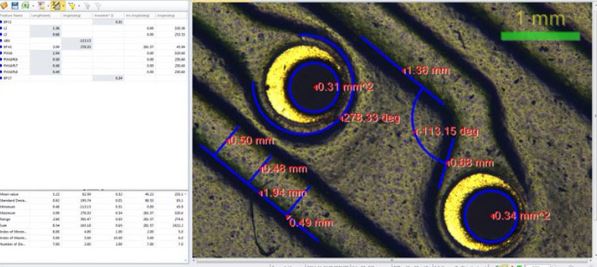
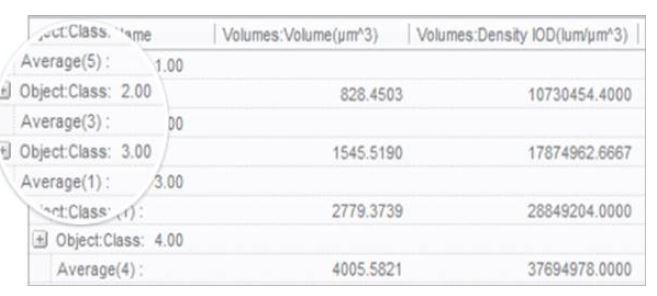
면적, 둘레, 길이, 진원도, 주축 및 부축, 각도, 중심, 내부홀 및 모집단 밀도등 50여가지가 넘는 수동 및 자동 측정 도구를 사용하여 각 객체를 분석합니다. 특정 객체에 태그를 지정하고 크기 또는 기타 측정 항목별로 정렬가능합니다
Count, Size & Sort Objects using Image-Pro Plus analysis software
Wound Healing Analysis – Image-Pro Plus Software
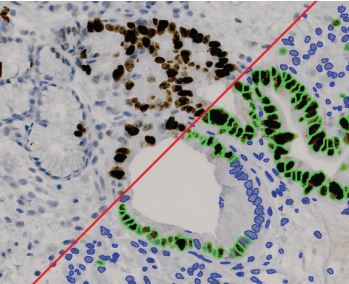
Classify
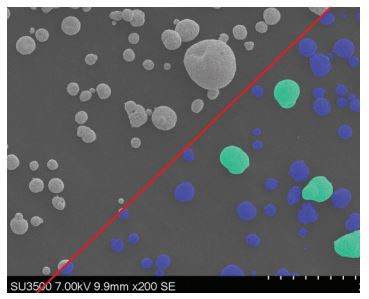
사용자 정의 분류 방법을 사용하여 분포 분석을위한 측정 매개 변수를 기반으로 셀, 입자 또는 객체를 클래스로 그룹화합니다
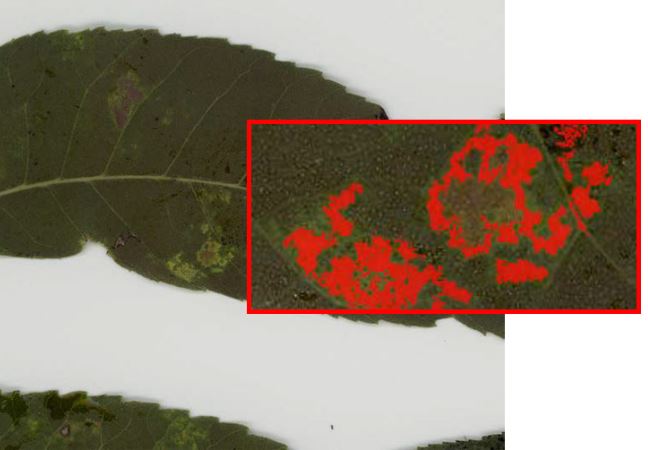
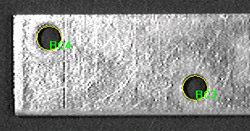
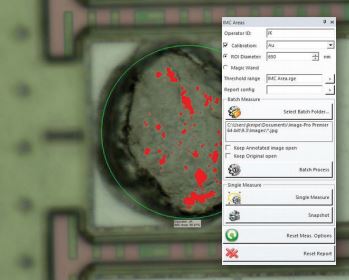
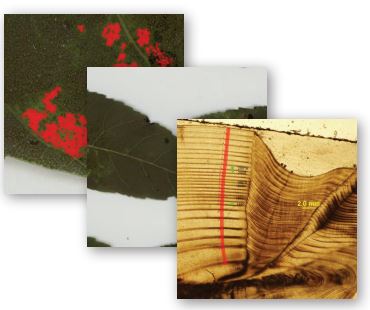
Threshold & Measure Objects
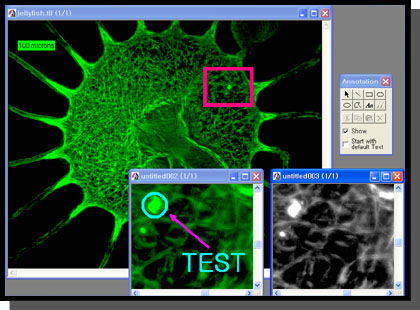
Interactive Measurements
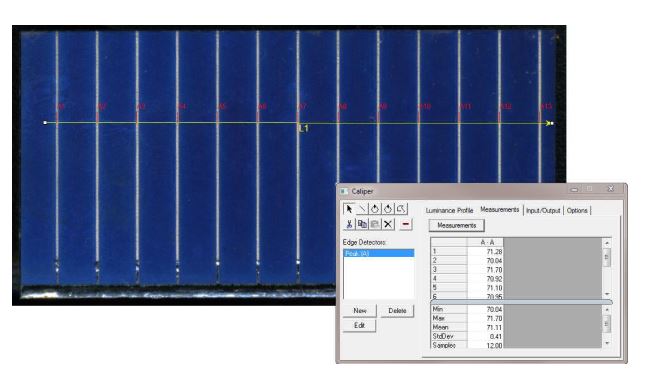
다양한 측정 옵션을 사용하여 이미지에서 수치화 가능한 데이터를 추출이 가능합니다. 계측 도구를 사용하면 가장 적합한 선, 호 및 원을 측정 할 수 있고. 캘리퍼 도구를 사용하여 를 규칙적인 간격 측정이 가능합니다.
Co-localization
생물학적 표본에서 공동 위치를 탐지하고 산점도에서 두 데이터 세트 간의 연관성을 그래픽으로 표시합니다.
Automate with Macros
Image-Pro Plus는 편리한 사용자 정의 도구와 내장 매크로 프로그래밍 언어를 제공하여 이미지 분석 절차를 간소화합니다. macro 기록 도구를 사용하여 자주 수행하는 작업을 저장하고 쉽게 편집 할 수 있습니다. Image-Pro Plus에 포함 된 시간 절약형 macro를 사용하거나 사용자가 제공 한 Solutions Zone 사이트에서 다운로드 바랍니다.
청정도는 많은 산업, 제약 및 의료 장비 분야에서 매우 중요합니다.
청정도는 모든 제품 공정과 기술 구성요소의 기능 생명 주기에 영향을 미칠 수 있으며 모든 제품은 잔여물과 입자 검출에 대한 특정한 요구 사항을 가지고 있으므로 궁극적으로 제품 및 생산 공정의 품질 개선을 위해 사용될 수 있습니다.
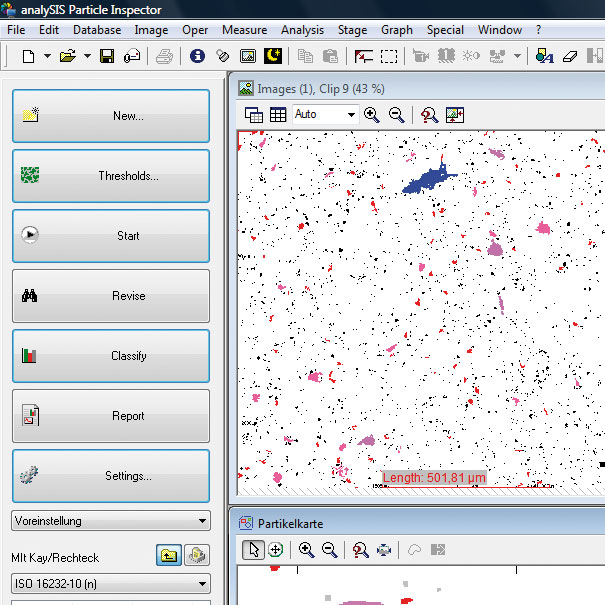
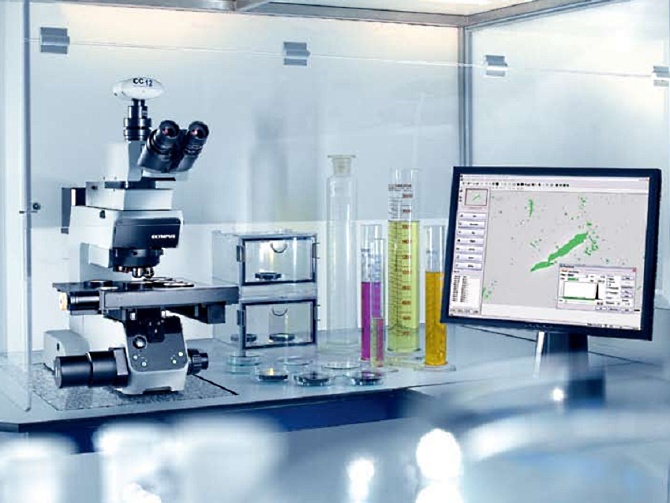
올림푸스 “Particle Inspector” 는 완전히 자동화된 입자 분석, 분류 및 문서화에 대한 포괄적인 시스템입니다. 이 시스템은 현미경, 디지털 카메라 와 컨트롤러를 포함한 전동 스테이지 그리고 입자 분석 소프트웨어로 구성되어 있습니다. 입자의 임계값 기반의 평가는 입자의 영역, 크기, 형상, 위치, 밀도와 휘도와 같은 입자의 특정한 측정 항목을 제공하며 제한되어 선택된 영역 및 개체 분류로 평가할 수도 있습니다. 프레임 독립 검출은 복잡한 데이터 설정들을 최소화하면서 필드 밖의 입자들을 합쳐 주고 정확하게 정량화 합니다.
또한 올림푸스 자동화 필터 검사 시스템, 자동화된 입자 분석 시스템은 여러 가지 스캔 경로 및 예측 포커스 지도 정의 뿐만 아니라 추가적인 측정 항목들도 고려합니다. 현미경은 BX 정립형 현미경 (고 분해능 및 1마이크로미터보다 큰 작은 입자의 인식을 위해서) 과 SZX 연구용 실체 현미경 (큰 입자 및 빠른 검사를 위해)을 사용합니다.
Features and Benefits:
Fast, accurate and repeatable particle counting and classification
Hands free operation requires no operator intervention
Fully automated with integrated microscope, camera, stage and software
Automated background correction
Flexible detection for particles down to the micron level
Complete archiving of all data
Automated report generation
International standards compliant : VDA 19, ISO 16232-10, ISO 4406/4407, NF-E-48-651/655, STD 107-0002, US 788
Microscopy in bioscience has progressed from the purely structural characterisation of fixed cells towards the investigation of processes in living cells with recent advances in fluorescence technology. Static morphological observation can now be complemented by the characterisation of the 3-D architecture of cellular structures and the real-time investigation of dynamic molecular processes in living cells. Newly developed fluorescence methods such as TIRF and FRET microscopy or GFP labelling are pushing the frontiers and widening the scope of bio-imaging.
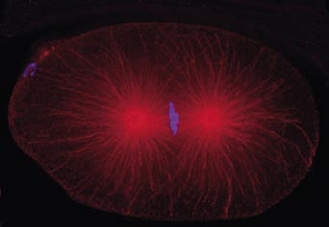
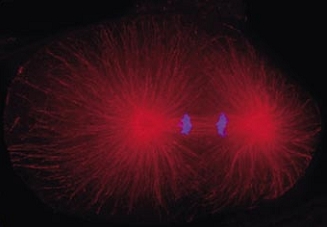
Time-lapse Imaging
Dynamic processes such as cell growth, metabolic transport and signal transduction are monitored routinely nowadays. The duration of such processes may vary from the sub-second range to hours or even days. Consequently it may be necessary to take several images per second or just one image every couple of minutes.
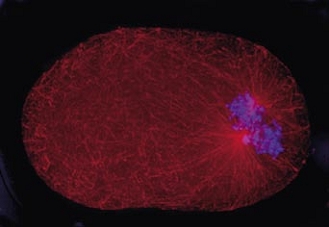
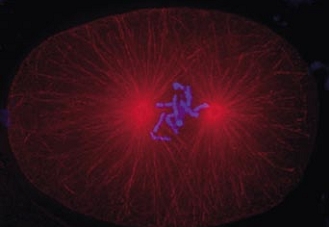
Cell division in the early C. elegans embryo, microtubules in red, DNA in blue.
Courtesy of K. Oegema, T.Hyman group, Max-Planck Institut, Dresden, Germany.
Multi-colour and GFP Imaging
The development of a growing list of specific fluorochromes covering the entire colour range enables the scientist to image and distinguish different sub-cellular structures simultaneously within one experiment through the use of multiple staining. If this is combined with time-lapse acquisition, the illumination unit of the microscope must be able to switch quickly between excitation wavelengths
Z-sectioning and Multi-dimensional Imaging
Microscopy is basically a two-dimensional observation technique while biological samples are three-dimensional. Therefore, in order to map the entire volume of the specimen, it can be imaged in layers by moving the focal plane in precise steps using a motorised Z-drive or a piezo-electric objective drive.
Ion Imaging / Ratio Imaging / Ca++ Imaging
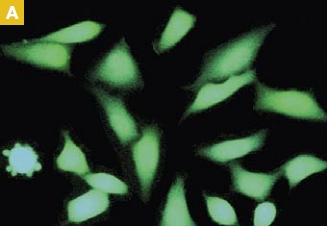
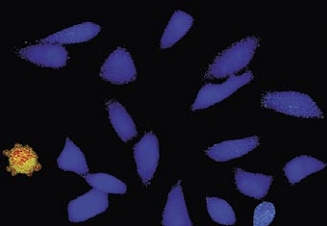
The fluorescence behaviour of several dyes is dependent on the concentration of certain ions such as calcium (Fura-2) or on the pH value (BCECF). The detection,
quantification and analysis of changes in fluorescence intensity are thus an indirect means to study important physiological processes.
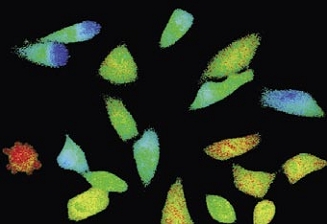
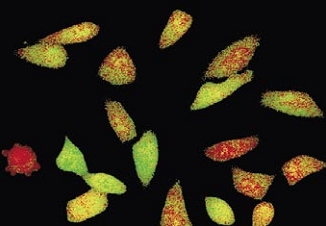
Time-lapse imaging:Fura2-labelled HeLa cells stimulated with APT.
Top : dual-excitation image; below; false-color ratio images revealing increasing calcium concentration.
FRET (Foerster Resonance Energy Transfer)
The measurement of fluorescence energy transfer from a fluorochrome molecule to an adjacent one can be used for the investigation of molecular interactions in cells. It requires the acquisition of images with different excitation and emission wavelengths and sophisticated correction algorithms.
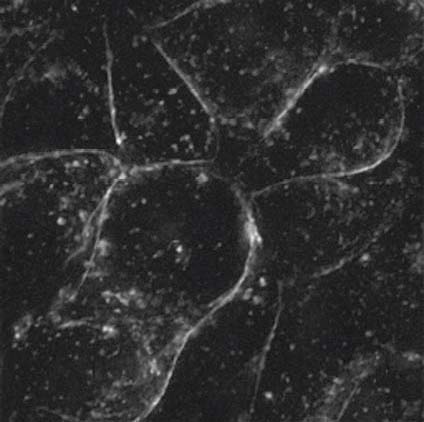
Investigating surfaces without interference from background light can be carried out using Total Internal Reflection Fluorescence Microscopy. Laser light coupled together with the standard fluorescence excitation allows fast switching between TIRF and wide-field fluorescence applications and can even support simultaneous observation.
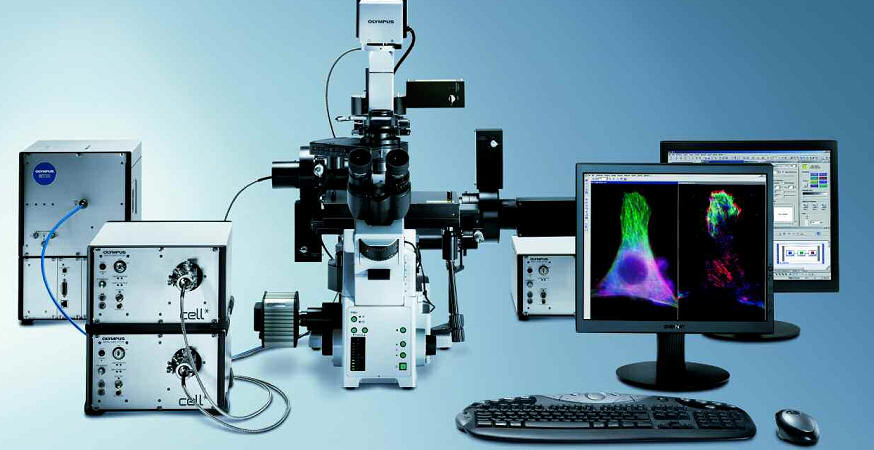
cell^tool TIRFM System
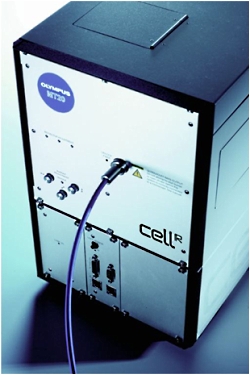
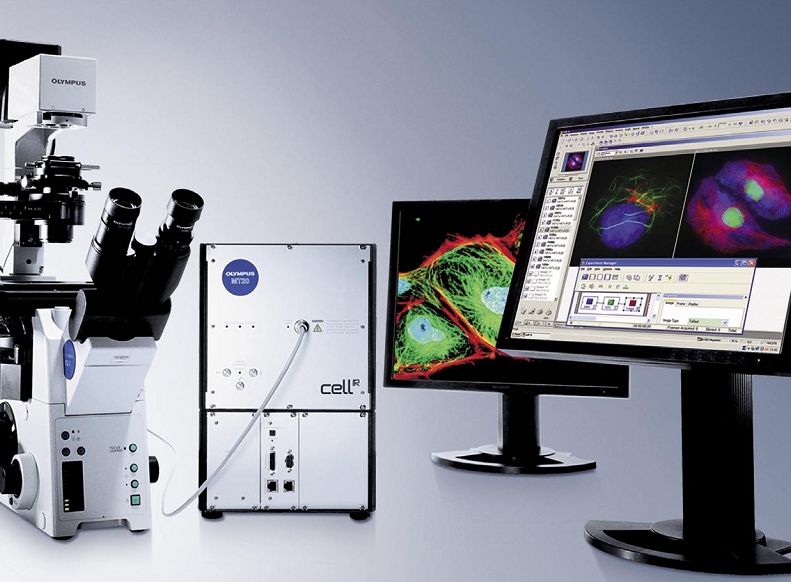
cell^tool TIRFM is based on a modular multi-port illuminator for up to three lasers and a MT10 or MT20 widefield fluorescence light source. This extension of the cell^M and cell^R imaging stations allows for laser based high resolution cell surface and membrane studies with the possibility of simultaneous widefield observation. The control of the TIRFM illuminator is integrated into the ‘Experiment Manager’ of cell^M and cell^R software, so in addition to highest quality TIRF observation cell^tool TIRFM offers all the powerful options of the cell* imaging stations.
The cell^tool TIRFM is available as a complete turn-key solution or as an add-on for existing cell^M or cell^R imaging systems.
Cell surface observation without out-of-focus blur Fully integrated into cell^M and ^R imaging stations Combination of up to three lasers plus a MT10/20 fluorescence illumination system Optimised beam alignment on individual laser ports
Single molecule fluorescence detection with TIRFM
Commencing as a challenging problem in physics with the first detection of a single fluorescent molecule in condensed phase at temperatures of liquid helium single molecule fluorescence detection has diversified into a collection of methods applied in various scientific disciplines.
With the advent of ultra sensitive detectors and optical instrumentation and by combination with confocal and TIRFM techniques single molecule detection developed into a feasible approach in life science. Decisive for this adaptability is the possibility to detect single molecule fluorescence at room temperature in solution (e.g. FCS) or on surface membranes of even living cells (TIRFM).
The following experiment conducted on an inverse microscope using the Olympus UAPO150xO/TIRFM objective is an example of the many applications for TIRFM single molecule fluorescence detection:
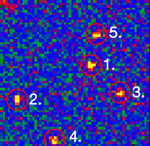
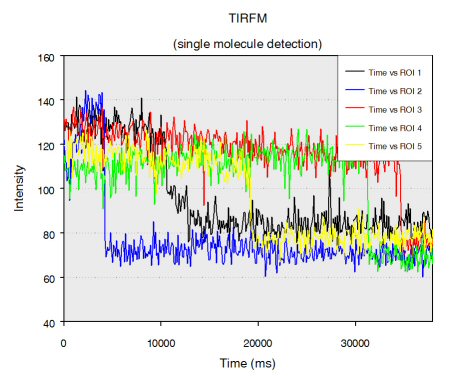
Single stranded RNA hybridised to a complementary biotinylated DNA, which was immobilised on a BSA-Biotin-Streptavidin coated cover glass. The RNA was mono-labelled with Cy3. Imaging of single molecules was confirmed by single step photo bleaching of the dye. Emission intensity plotted versus time decays immediately after bleaching a single dye molecule (ROIs 2-5), contrary to a group of fluorescent molecules whose emission would decrease in a multistep exponential manner (ROI 1).
Figure 1: Fluorescence intensity (colour coded. Circles mark five regions of interest (ROI). Each ROI (except of ROI 1) contains one single fluorescent molecule as verified by single step photobleaching: See movie with fluorescence intensity recorded over time (to download the film click on figure 1) and corresponding emission intensity curves plotted vs. time for the selected ROIs (Figure 2, bottom of the page).
Total internal reflection (=TIR)
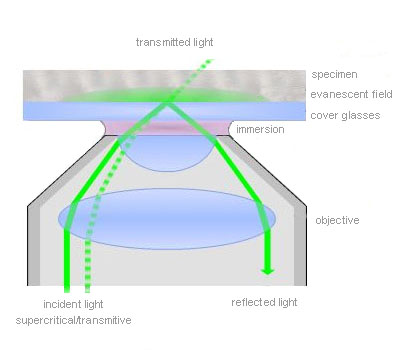
TIR is an optical phenomenon. If light is travelling through a medium with a high refractive index and strikes the interface of an optical medium with a lower refractive index at an angle greater than the critical angle, the incident light will undergo total internal reflection. Under these conditions some light still enters the low refractive index medium as an electromagnetic wave termed the evanescent wave. The intensity of this wave decays exponentially with penetration depth. The average z-expansion is less than 200 nm depending on the wavelength of light, the incident angle and the refractive index of the media. In TIRFM, fluorophores in the sample at a maximum distance of ~100 nm from the coverslip surface are selectively excited. This z resolution of 100 nm is one-fifth of an optical section obtained with a laser scanning confocal microscope. Therefore TIRFM is ideally suited for the observation of processes and structures on or close to the cell surface.
Total Internal Reflection Fluorescence Microscopy
Total internal reflection (=TIR) is an optical phenomenon. If light is travelling through a medium with a high refractive index and strikes the interface of an optical medium with a lower refractive index at an angle greater than the critical angle, the incident light will undergo total internal reflection. In biological investigations involving living specimen, these prerequisites are met if a laser beam travels through glass, for example a microscope slide (refractive index n = 1.52), towards an aqueous buffer solution or cell surface (n = 1.33 – 1.38). The beam is totally reflected at the interface between the glass and the medium or the cell surface respectively. But the reflected light generates an electromagnetic wave termed the evanescent wave which enters the low refractive index medium. The intensity of this wave decays exponentially with penetration depth along the z-axis. The penetration depth depends on the wavelength of light, the incident angle and the refractive index of the media. The thickness of the optical section that generates fluorescence under TIR can be adjusted by changing the incident angle and has a range between a few hundred and 50 nm at minimum. That is up to one-tenth of an optical section obtained with a confocal laser scanning microscope. Thus in TIRFM, fluorophores close to the coverslip surface can be selectively excited. As in confocal microscopy background fluorescence is nearly absent in TIRFM, because the fluorophore excitation is restricted to the focal plane of the objective. Therefore TIRFM gives high-contrast images of the cell surface with excellent signal-to-background ratio and is ideally suited for the observation of processes and structures on the cell surface and within or close to the plasma membrane.
In contrast, widefield fluorescence microscopy provides limited spatial resolution in z-direction because background fluorescence from outside the focal plane often impedes the detection of small or weakly fluorescent structures.
TIRFM does not require the rather expensive scanning microscope technique because it generates widefield illumination at the specimen surface. It can be performed relatively cost-efficient with inverted fluorescence microscopes equipped with a special episcopic fluorescence illuminator, special high NA objectives and a laser.
Confocal microscopy has the clear advantage in not being restricted to the optical section directly adjacent to the coverslip/specimen interface. However optical sections obtained by TIRFM can be up to one order of magnitude thinner than by confocal microscopy. Further-more, being a widefield technique, TIRFM comprises the considerable advantages of a higher acquisition speed as compared to scanning microscopy.
The TIRF Microscope
TIRFM is a widefield microscopy technique and consequently modified fluorescence microscope set-ups are used. Lasers are commonly employed as illumination sources because the light is coherent, polarised, intense and well collimated. If a special dual port epi-fluorescence condenser is used the change from widefield illumination with a standard arc lamp to the TIRF laser is rapid and straightforward and does not interfere with the beam alignment.
For TIRFM with inverted microscopes, the incident beam is focused off-axis at the objective back focal plane such that it passes the very periphery of the pupil of a highly refractive objective. The objective’s numerical aperture must be at least 1.38 to exceed the refractive index of a living cell. Thus the incident beam emerges from the front lens into the immersion oil in such a way that it reaches the glass/cell interface in a critical angle and undergoes total internal reflection. The off-axis position of the laser beam determines the incident angle and the depth of the evanescent field accordingly. The further off-centre the alignment is, the larger is the angle and the shallower is the evanescent wave.
Olympus offers a range of special TIRF objectives with very high numerical apertures (NA). There are three objectives available with a NA of 1.45 that can be used with conventional immersion oil and cover slips. With the PLAPON60xO/TIRFM-SP, the PLAPO100XO/TIRFM-SP or the new UAPO150xO/TIRFM-SP a penetration depth of the exciting wave around 100 nm is reached. The UAPO150xO/TIRFM is especially designed for single-molecule detection in TIRFM. The APO100XOHR features an unsurpassed NA of 1.65. To match the extreme high NA special high-refraction cover slips and special immersion liquid (diiodomethane) are required. Therefore the objective offers a unique short penetration depth of about 50 nm and high flexibility regarding the marginal angle available for TIR. The 60x and the 150x objec-tives have a temperature correction collar. Common plan apochromatic objectives like 100x with NA = 1.40 can also be employed for TIRFM, but they are less convenient due to the small angle that is available for the total internal reflection.
Applications
The visualisation of molecular interactions on surfaces is of fundamental interest in cell and molecular biology because many molecular transport and signal transduction processes are transmembrane incidents. Examples are binding and triggering of cells by hormones, neurotransmitters and antigens, cell adhesion to surfaces, electron transport in the membrane, cytoskeletal and membrane dynamics, cellular secretion events and vesicular fusion events with membranes. TIRFM is the perfect tool for visualisation of these processes. The extraordinary small depth of field of TIRFM assures that only surface-bound fluorophores are detected. Fluorophores in the surrounding medium remain invisible though they might be in rapid exchange and be present in large excess. This is different from normal widefield illumination where they would create overpowering background fluorescence.
During many experiments it might be desirable to switch rapidly between TIR illumination to observe the surface and standard epi-illumination to investigate the deeper layers of the specimen as well. For example, a transient process may involve simultaneous but not identi-cal processes in the membrane and the cytoplasm. The Olympus BioSystems dualport illuminator for combined TIR and widefield illumination allows the fast and synchronised alternation of the two techniques. The techniques of TIRFM, DIC and other microscopy techniques as FRET, FRAP and FLIM can also be combined.
Cell Software 소개
준비중입니다.
Cell Hardware 소개
Cell Hardware features
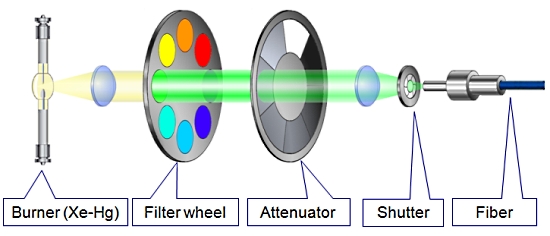
1. MT20 광원 장치
Cell 시스템에서 가장 중요한 장치 중 하나인 광원 장치는 MT20 광원 시스템을 사용합니다.
MT20 광원 장치는 두 가지 타입의 램프 (Xeneon 혹은 Xe/Hg)을 사용할 수 있으며 전원 장치가 내장되어 뛰어난 광량의 안정화를 이루었습니다.
또한 내장된 8개의 필터 장착 휠은 고속의 회전으로 즉각적인 필터 변경을 가능케 하며 14단계의 광량 감쇄기 휠 뿐만 아니라 1ms의 고속 셔터도 지원합니다.
MT20 만의 유일한 기능
1. 병렬 처리
– 필터 교체
– 셔터 개폐
– 광량 조절
시편의 Bleaching 감소를 가능하게 합니다.
2. 광원 소스의 안정성 증대
정량 분석에 필수적인 조건
3. 사용자 친화적
도구가 필요하지 않은 필터 장착
[ MT20 광원 시스템의 광학 설계 ]
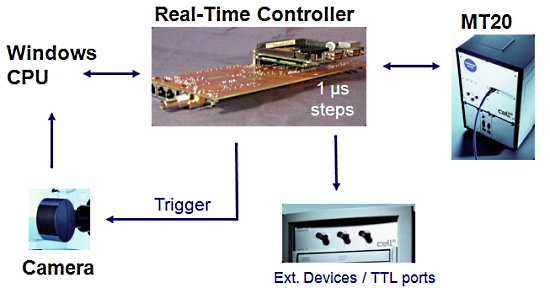
2. 실시간 제어기 (Real-Time Controller)
Cell 시스템에서 또 하나의 매우 중요한 장치로 이미징 워크스테이션 내의 실시간 제어기 (real time controller)보드가 있습니다.
이 실시간 제어기가 광원 장치, 카메라 및 현미경의 제어를 실시간으로 하드웨어적인 처리를 제어 함으로써 시편의 Bleaching을 극소화 할 수 있습니다.
또한 Time point 기반의 실험에서 1us 단위의 매우 정확한 Time point를 보증할 수 있게 하여 분석 결과의 신뢰성을 높여 줍니다.
[ 실시간 제어기의 이점 ]
A. 필터 휠 (Filter wheel)을 사용한 일반적인 이미징 시스템
하나의 이미지 쌍을 획득하는데 650ms 이상의 시간이 걸림
B. Cell^R 병렬 처리 시스템
Cell^R 실시간 처리기 사용시 최소 2배 이상 빠름
위의 처리 순서 비교 이미지를 보면 셔터 개폐 시간 10ms, 카메라 노출 시간 50ms, 카메라 Readout (데이터 전송) 시간 80ms, 필터 교체 시간 50ms 기준으로 두 시스템간의 차이를 비교 한 것입니다.
일반적인 순차 처리 방식의 시스템의 경우 PC에서의 지연 시간 및 필터 교체등에 의한 진동의 영향을 받게 됩니다.
Cell 시스템은 실시간 처리기를 사용함으로써 일반적인 순차적인 제어가 아닌 병렬적인 동시 제어가Hardware적으로 가능함을 알 수 있습니다.
이는 더 장시간의 더 많은 이미지를 Bleaching이나 Cell Dead가 없이 정량적 분석이 가능함을 나타내며 동일 조건시에 더 많은 노출 시간을 확보할 수 있음으로 카메라의 영상 품질의 향상 역시 기대할 수 있습니다.
위 이미지에서 샘플에 형광 Excitation이 노출 되는 시간을 비교하면 A의 경우 170msec, B의 경우 50msec 로 1/3 이하의 노출 만으로 동일한 조건의 이미지를 획득할 수 있게 됩니다.
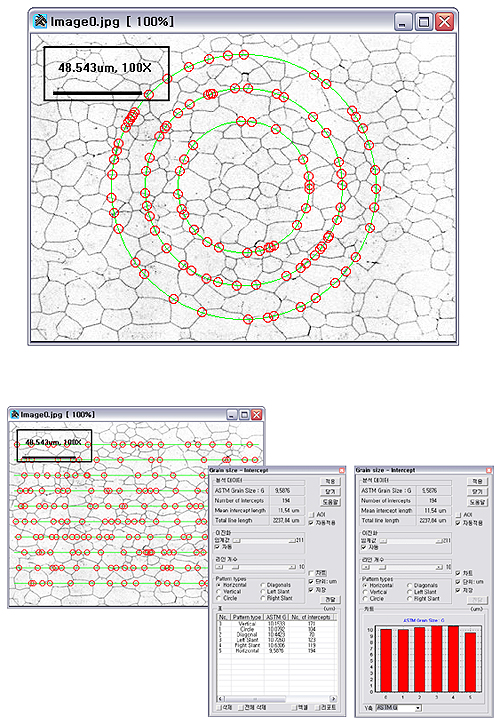
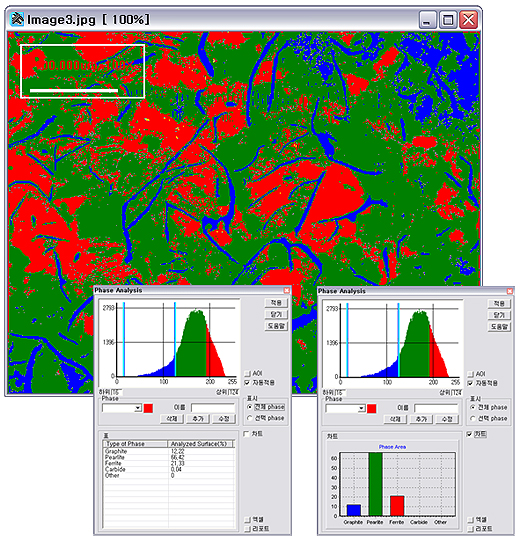
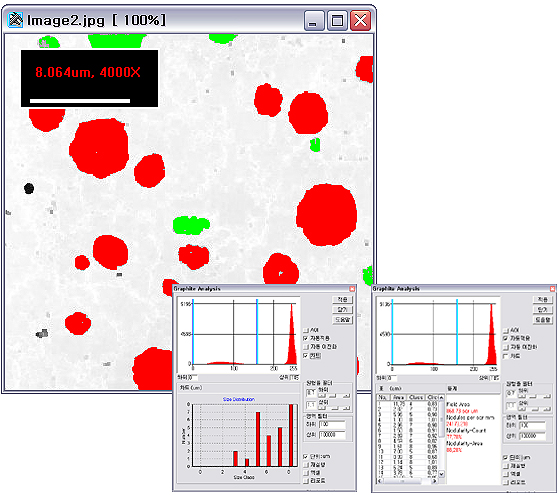
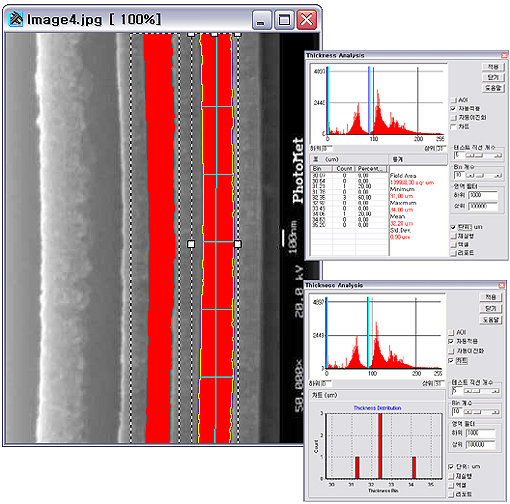
TDI Plus에 Material 분석 기능을 추가하여 Grain Size, Phase, Microhardness, Nodular Cast Iron의 Graphite, Thickness 분석이 가능한 고급 이미지 분석 프로그램입니다.
Grain Size 분석
▪ ASTM E112 지원 ▪ Intercepts, Planimetric* method ▪ Test Line 개수 지정 ▪ 다양한 Intercept 패턴 지원 (Horizontal, Vertical, Circle, Diagonals, Left Slant, Right Slant) ▪ 통계자료 (ASTM E112) ▪ Number of intercepts, Mean interrcept length, Total line Length ▪ 테스트 라인의 개수 및 수직, 수평, 원형, 사선 등 테스트 라인 형태 지정 가능 ▪ Planimetric 방식의 Grain size 분석* ▪ Inner, Border Grain Size 계산*
* : 지원예정
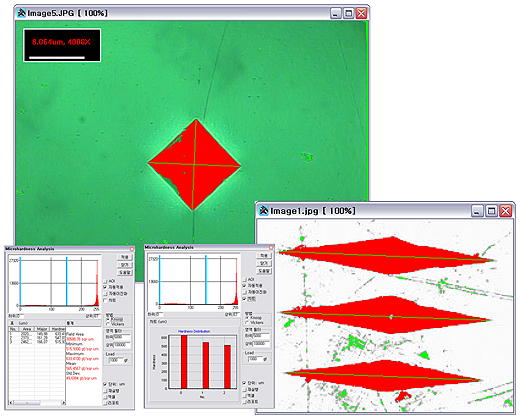
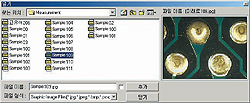
Micro Hardness 분석
▪ ASTM E384 지원 ▪ Knoop, Vickers 경도계 지원
Phase 분석
▪ ASTM E562 지원 ▪ Multi phase 분석 기능 ▪ Phase Fraction 출력
Cast Iron 분석
▪ ASTM A247 지원 ▪ Nodules per area ▪ Nodules by Count(%), Area(%) ▪ A247 size 분포
Thickness 분석
▪ ASTM B487 지원 ▪ 테스트 선의 개수, 방향지정 ▪ 각 Coatinig별 데이터 분포 출력
Material Analysis Function이 추가되어 한층 업그레이드 된 이미지 분석 소프트웨어로서 전문가적인 환경으로 이미지 분석에 도움이 됩니다.
Open & Navigation
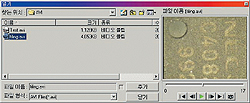
▪ 미리보기 지원 ▪ JPEG, Windows Bitmap(BMP), Zsoft(PCX), TIF 등 다양한 파일 포멧 지원
▪ 동영상 이미지 Play 기능및 프레임 캡쳐가능
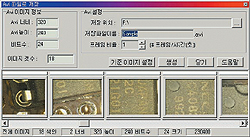
▪ 여러개의 이미지를 이용하여 Avi 동영상 파일로 저장 가능
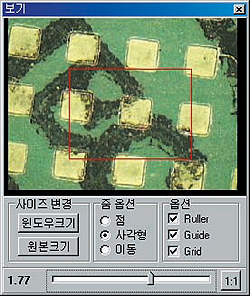
▪ Zoom과 Planning을 통한 세밀한 이미지 분석 지원
▪ Zoom/Out – 영상의 확대에 디지털 영상의 특성으로 의한 계단현상을 최소화 하기 위한 Bilinear 샘플링 지원
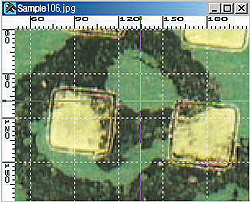
▪ 실측 Ruler, Grid와 마우스 가이드등을 출력
Object Browser & Annotation
Objct Browser
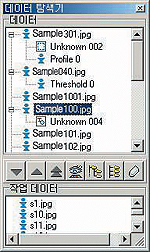
▪ 데이터 탐색기 : TDI Plus에서 동작되는 모든 이미지, 결과 데이터 관리를 한 화면에서 관리함으로써, 여러 윈도우가 열려서 동작중일 때도 손쉽게 영상 및 데이터 관리가 가능 Annotation
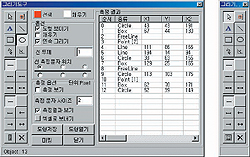
▪ 이미지에 문자나 선, 도형을 그려 넣을 수 있어 사용자가 원하는 Annotation 데이터를 이미지에 직접 표현 가능 ▪ 수동 객체 카운팅, 수평 직선, 수직 직선, 대각선, 원, 사각형등을 간단히 측정
▪ 작업 데이터 : 여러 이미지를 이용한 분석시 손쉬운 작업 환경 제공
Capture
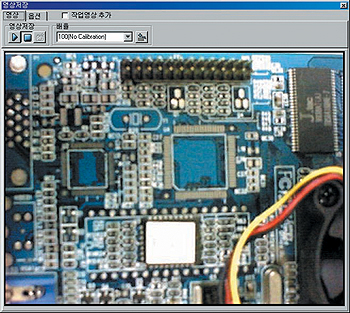
▪ 다양한 Frame Grabber 지원 ▪ SEM 영상 획득 가능 ▪ Live View -고속모드 : 전체 화면 보기 -저속모드 : 평균값 보기 (Averaged Live) 동작중 Zoom In/Out, Drawing, Measuring 등 가능 ▪ 시간설정 자동 Capture
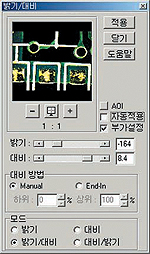
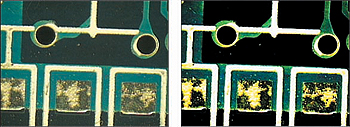
Brightness / Contrast
▪ 전체 이미지나 선택 영역의 밝기와 대비를 조정 ▪ 밝기, 대비, 밝기/대비 조합 작업의 모드별 선택 가능
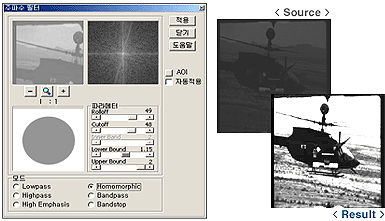
Frequency Filter
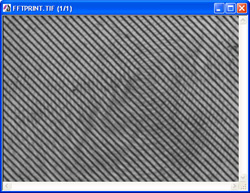
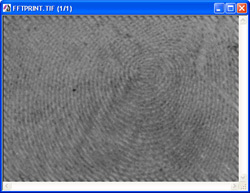
▪ FFT 필터에 의한 암부 개선및 잡음 개선 가능
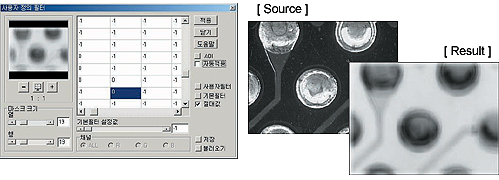
User Filter
▪ 필터의 계수를 임의로 설정하여 영상에 적합한 필터 생성 ▪ 임의의 마스크 크기 (최대 100×100) 설정 가능 ▪ 사용자 정의 필터의 저장 및 불러오기
Histogram
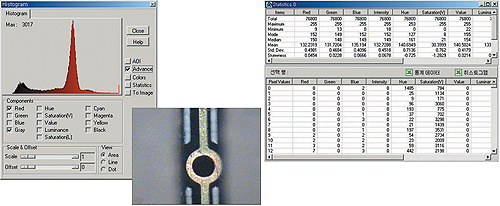
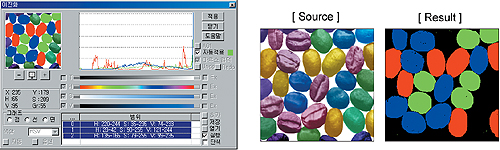
▪ 영상의 RGB/HSV/HLS/CMYK 채녈에 대한 분포 분석 ▪ 히스토그램의 누적합, 평균, 표준편차, 기울어짐, 최대, 최소등 12가지 통계데이터 산출 가능 ▪ 통계 데이터의 엑셀 연동 가능
Profile
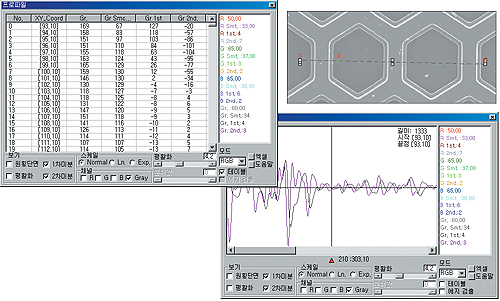
▪ 영상의 RGB/HSV/HLS/CMYK 채널에 대한 프로파일 분석 ▪ 프로파일의 1차, 2차 미분 그래프 분석 ▪ 3가지 스케일 모드 분석 (일반, 로그, 지수) ▪ 분석에 대한 통계 데이터 출력 및 엑셀과 연동
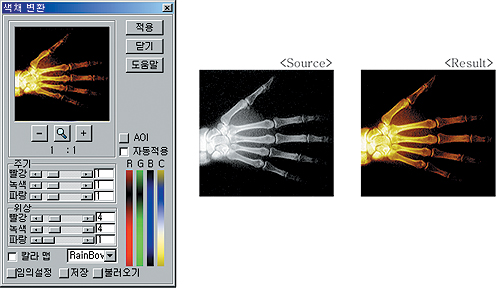
Pseudo-Coloring
▪ Gray Scale Image에 가상 색상 출력 ▪ 전자 현미경 영상 및 Spectrum 이미지 등에 가상색상을 입힘으로써, 경계 강화 등의 효과
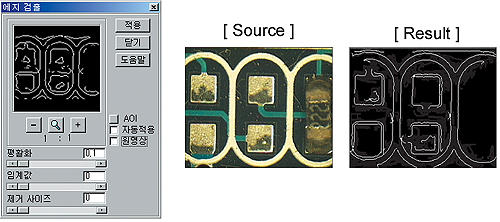
Edge Detection
▪ 정확한 이미지의 경계산 검출 (영교차점 분석) ▪ 에지 검출 필터 크기 조정 가능
Threshod
▪ 이미지에서 원하는 Object나 영역, Color를 분할, 추출 ▪ 다중 임계 영역 설정 ▪ 전체 이미지 또는 AOI 영역에 대해 설정 값을 기준으로 Binary 이미지를 생성 ▪ 마우스를 이용 화면에서 영역 선택 또는 Threshold 값을 이용하여 손쉽게 영역 설정
Measurement
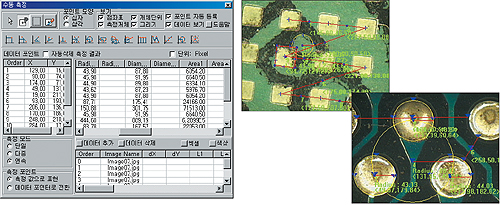
▪ 점/ 두점의 중점/ X축 또는 두 직선 사이의 교각/ 점과 직선사이의 거리/ 사각형/ 원/ 두원의 교점/ 원과 직선의 교점/ 피치/ 연속된 직선들의 사잇각/ 다중 점의 최적 직선/ 원 근사/ 다중점 그룹의 중심점 등의 다양한 측정 ▪ 측정에 의해 파생된 데이터 포인트의 연계 측정 ▪ 원과 원의 중심간 거리, 원과 선 중심의 거리등 다양한 조합 ▪ 영교차점 검출 방식에 근거한 경계점 포인트의 자동 입력 ▪ 측정시 축척 설정에 의한 실측 ▪ 엑셀 전송 등을 통한 결과 데이터 관리
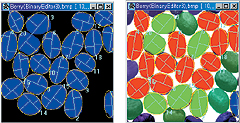
Binary Editor
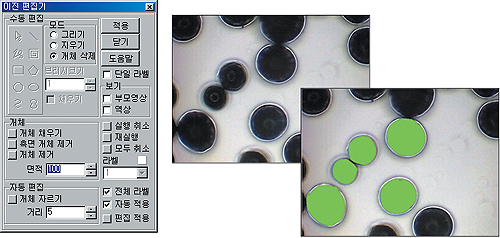
▪ Blob Analysis를 위해 이진화된 영상의 각 Object 를 나누거나, 합치는 등의 작업 수행 ▪ 선/ 사각형/ 원/ 타원/ 다각선/ 개곡선/ 폐곡선 등 다양한 편집 기능 지원 ▪ Object 펜 기능을 이용하여 각각의 Object 단위로 편집 가능
Blob Analysis
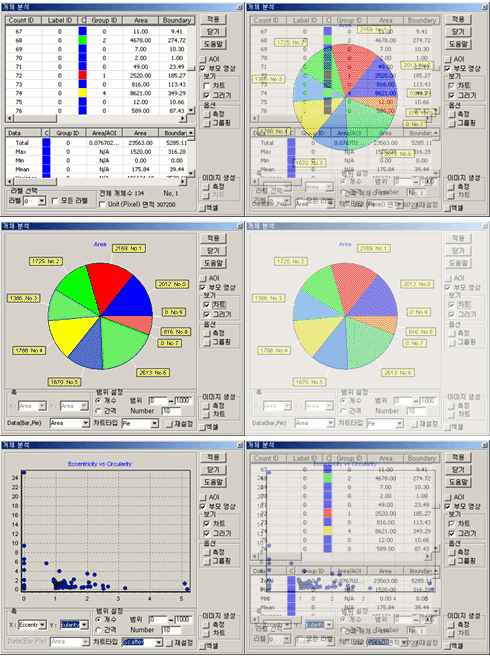
▪ Area, Length, Major, Minor, Eccentricity, Circularith, Total Median, Total Mean, Total Standard Deviation, Total Skewness, Total kurtosis, Total Coefficient A, Total Coefficient B, Total Corelation, Coe4fficient등 다양한 데이터 측정 ▪ 사용자가 원하는 데이터로 데이터 재분류 그룹화 ▪ 다양한 차트와 데이터 관리
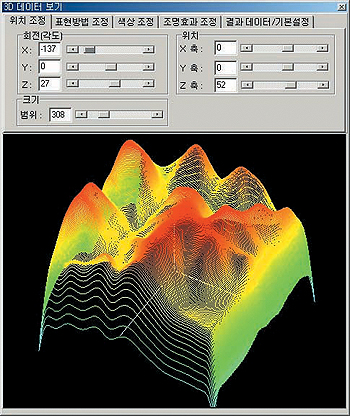
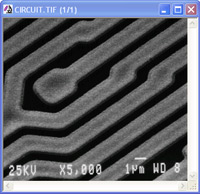
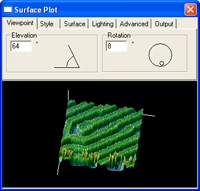
3D Data View
▪ View Angle의 조정, 밝기 분포에 따른 칼라 설정, Light Source의 설정, WIre-Frame 및 Surface Rendering 지원
▪ 이미지의 Brightness 값을 기준으로 이미지를 3차원으로 표현
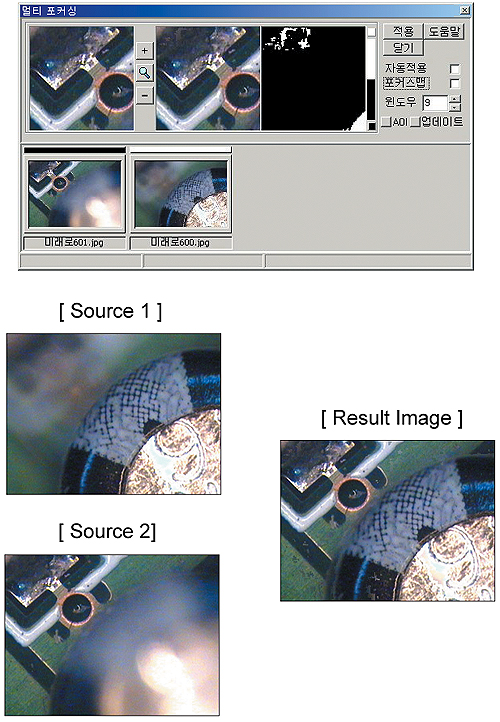
Multi-Focusing
▪ 국부적인 초점 영상들을 조합하여 하나의 깨끗한 초점 영상으로 합성
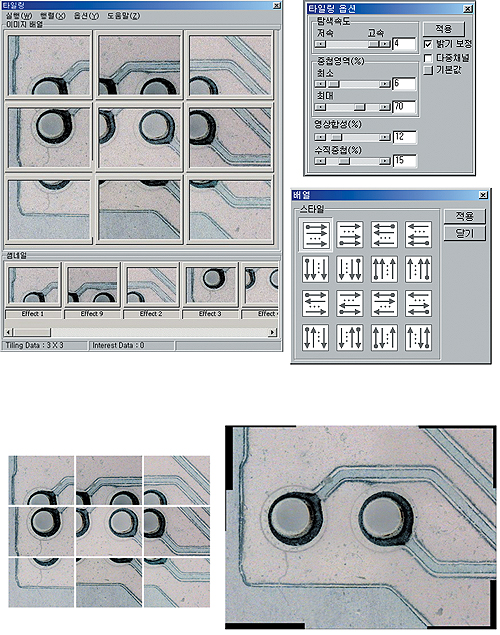
Tilling
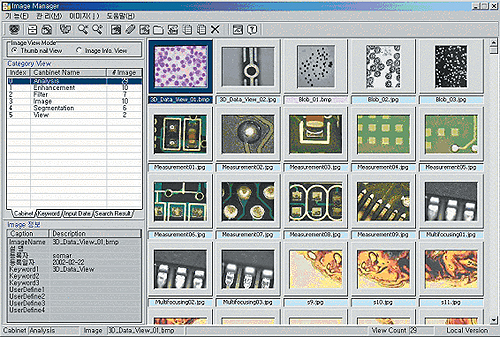
Image Manager
▪ 파일 시스템 지원 ▪ 로컬 데이터 베이스 시스템 지원 ▪ Client/ Server 데이터베이스 시스템 지원, 소규모 네트워크 화일 공유 (사용자 관리 – 권한에 따른 사용 기능 제한)
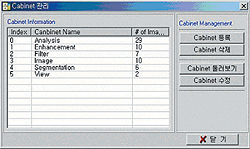
Cabinet 관리
▪ 이미지 분류별 관리
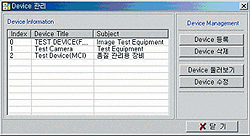
Device 관리
▪ Capture Device 관리
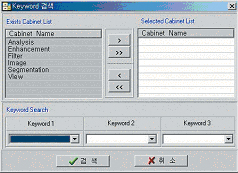
검색
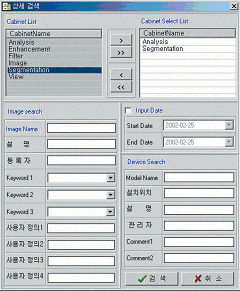
▪ 이미지 정보를 통한 다양한 검색 가능
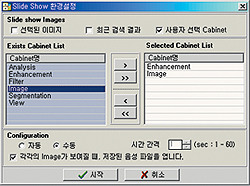
Slide Show 환경설정
▪ 해당 폴더의 영상을 이용하여 슬라이드쇼 기능 ▪ 자동 수동 모드 지원 설정 가능 (다음, 이전 등을 키보드로 동작)
이미지 정보 보기
▪ 사용자가 원하는 정보를 이미지에 설정 가능
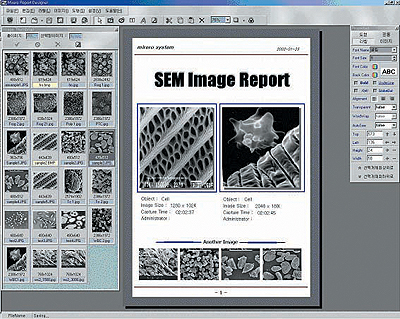
Report Designer
▪ 저장된 폼을 통한 편리하고 다양한 레포트 작성 가능
▪ 여러 가지 형태로 이미지의 입력위치 지정 가능
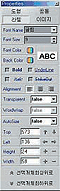
속성창
▪ Report에 사용자가 원하는 정보 입력 가능 ▪ 간단한 Annotation 가능 ▪ 폼에 데이터 고정 입력 지정 가능
이미지 Thumbnail
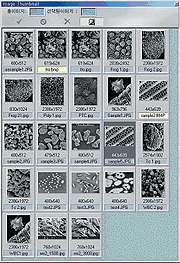
▪ Report에 추가할 이미지 리스트 보기 가능
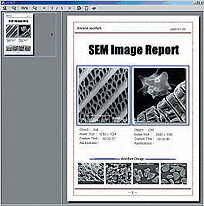
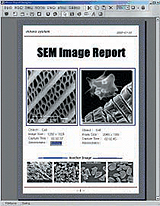
미리보기
▪ 작성된 Report 미리보기 기능
Specification
Capture •다양한 Frame Grabber 지원 •SEM 영상 획득 가능 •Live view – 고속모드: 전체화면보기 – 저속모드: 평균값보기(Averaged Live), 동작중 Zoom In/ Out, Drawing, Measuring등 가능 •Lime-lapse 캡쳐
파일처리 •이미지 동시 열기(Multi-Open)와, 계속열기(Continous Open), 미리보기 지원 •동영상화일(AVI)열기, 실행(Play)와 원하는 영상 Capture •다양한 파일 포멧 지원 :JPEG(JPG), TIFF, Bitmap(BMP), Zsoft(PCX), TGA 등 •정지영상 Sequence를 동영상으로 생성(AVI)
영상편집 •영상 자르기, 복사, 새로운 파일로 복사영역 붙여 놓기 지원 •Text, 라인, 원, 타원, 자유선, 사각형 등 도형 요소그리기 •Vector 요소로 처리하여, 이미지의 배율에 관계없이 선명한 Drawing 가능 •도형요소의 Multiple 선택, 선택된 요소의 이동, 크기변환, 임의삭제가능 •닫힌 도형 요소에 대해, 임의의 Color로 Fill지원 •Calibration된 기준에 의해, 길이 면적 등 표시 •이미지 위에 직접 그려넣기 기능 •Annotation 요소를 별도로 파일 저장 및 불러오기 지원
AOI 처리 •선, 원, 사각형, 자유선, 폐곡선, 개곡선 등 다양한 형태의 AOI설정 •Multiple AOI 지원 :동시에 여러개의 AOI영역에 대해 영상 처리 가능 •AOI 라인에 대한 Profile View 지원 :Color Model별 선택 가능 •AOI 영역을 Cut 하여, 새로운 영상 생성가능 •AOI 영역의 회전 및 이동, 크기 변환 지원
마커바 •영상 편집이나, 측정에 사용되는 기준 단위 설정 •다중 배율과 기준단위 설정 가능 •마커바의 자유로운 위치 설정 및 모양이나, 색 지정 가능 •이미지에 마커바정보 써넣기 가능
이미지 핸들링 •Image Navigator를 이용한 손쉬운 영상 관찰 •스크롤바, 마우스를 이용하여, Zoom In/Out 동작을 수행 •방향키 및 관찰박스, Planning기능을 이용하여, 화면의 관찰영역을 용이하게 변경가능 •이미지 관리 도구를 이용하여, 현재 열려 있는 화면을 손쉽게 관리 •Ruler, Guide, Grid 기능 지원
기하학적 변환 •영상의 임의각도 회전, 크기 변환, 좌우, 상하 대칭 이동 •영상의 Shear, Shift, Perspecive, Affine 변환등 지원 •Cubic, Liner, Neer등의 보간 방법 지원
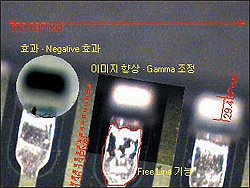
영상 개선 •AOI 처리 선택, Preview, Advance Option으로 구성된 편리한 대화상자 •영상의 색상 분포에 대한 Contrast/Brightness조정 •Color 채널별 감마보정, Negative, Equalize등 영상 향상 기능
이미지연산 •가감, 곱 등의 산술연산 및 AND, OR, XOR 등의 논리연산 가능
Color처리 •RGB, HSV, CMYK, HLS Color 모델별 채널 분리 및 결합 •Color Depth의 변환 •자동및 수동으로 흑백 영상에 가상 칼라 적용
다양한 필터 연산 •다양한 마스크 크기 설정 적용 가능 •연산횟수 지정 •적용할 컬러 채널 선택 •공간필터 – Blur, Prewitt, Gaussian Blur, Median, Max – Min, Sobel, Laplacian, Sharpen •주파수 필터 – Cuff Off 범위 지정가능 – Low Pass, High Pass, High Emphais, Band Pass, Homomorphic, Band stop •형태학적 필터 – Dilation, Openning, Erosion, Closing,Boundary, Skeleton, RegionFill, HitOrMiss, Connect, Thinning •사용자 정의 필터 : 최대 100*100 크기의 사용자정의 필터 제공, 필터 저장, 불러오기
Binary Editor •Blob Analysis를 위해 이진화된 영상의 각 Object를 나누거나, 합치는 등의 작업수행 •선/ 사각형/ 원/ 타원/ 다각선/ 개곡선/ 폐곡선등 다양한 편집기능 지원 •Object 펜 기능을 이용하여 각각의 Object단위로 편집 가능
영상분할 •이진화 -채널별 밝기값, 또는 마우스를 이용한 채널별 색상 범위 선택에 의한 이진화 지원 -선택 영역의 다중선택, 다중 영역의 논리합, 차 선택 -선택 영역의 저장 및 불러오기 •다중레벨 분할 -밝기 분포와 밝기 영역에 근거하여 영상 분할 •에지 검출 -Color 채널별 에지 검출
수동측정 •Measure1 :수평, 수직, 자유선, 각도, 원, 사각형, 면적 등 단순측정 •Measure 2 : 두점의 중점, 각도, 두선의 만나는 각도, 세점에 의한 원, 원과 원의 교차점, 연속측정 : 직선 근사, 원근사, 원과 선분의 만나는 점 등 측정하고자 하는 대상 선택후 측정
자동측정 •항목 -Geometry: Area, Boundary, 장축길이, 단축길이, 이심률, 원형도, 면적분포 -Color : RGB 각각의 Min, Max, Average, Mean, Skewness, Kurtosis, Sum, Standard Deviation •색상분포 곡선의 1차 직선 근사(A, BCoefficient), Correlation Coefficient 크기등 19가지 조건으로 대상 오브젝트를 그룹화하여, 색상을 다르게 표시 •원영상에 표시, 외곽 개체 제외 •크기등의 각 항목에 대해 자동, 수동으로 분류 개수 지정, 또는 분류 항목 및 범위 지정하여 그룹화 가능 •측정된 항목에 대한 분포도, 항목과 항목간의 산포도, 각 항목의 전체 분포 비율 차트 등 지원
기타 분석 기능 •Multi-Focusing :포커스가 다르게 설정된 동일한 개체의 영상을 포커스 맵을 이용하여, 한장의 선명한 영상을 생성 •Tilling :인접한 여러장의 영상을 한장의 큰 영상으로 생성 •3D Display :밝기 값을 이용하여 3차원으로 영상 표시
Image Manager 및 Report Generator연동 •Image Manager로 부터 영상 읽어오기 및 저장 지원 •미리 정의한 형태대로 획득한 영상을 프린트 할수 있도록 Report Generator와 연동
기타 •항목별 도움말 기능으로 손쉬운 학습 및 운용지원 •처리 데이터를 Excel Data로 Import •Chart나 그래프를 이미지로 변환하여, Windows 에플리케이션 프로그램으로 손쉽게 이동가능 •윈도우 Clipboard로 복사, 붙이기
■ Image Manager
시스템 구성 •다양한 데이타베이스 구성(Configuration)지원 :Local파일, 데이타베이스, Enterprise 데이타베이스 지원 •데이타베이스 서버 구성시, 사용자 권한 관리 및 사용자 관리 부분 추가
슬라이드 쇼 •폴더 단위로 Full Screen Slide Show 기능 :자동, 수동 모드 지원 •파일 자동 정리
Cabinet 관리 •Cabinet 개념으로 Folder 관리 지원 :생성, 변경 삭제등 간단한 Image Capture 지원 :바로 영상을 획득해서 DB에 입력 가능
영상관리 •영상을 Cabinet에 등록 :디렉토리 자동추출, 파일이미지 추가, Capture추가등 지원 •영상 자료를 영상 정보와 함께 입력, 수정, 삭제 등 지원 •영상 자료의 Cabinet별 이동과 검색(키워드, 상세정보검색)
영상 검색침 View •다양한 형태의 영상 검색 방법 지원(사용자 정의 키워드, 날짜, Cabinet등) •Thumbnail List & Image Information View, Image List, Preview등 지원 •외부이미지 Viewer 프로그램 연결 지원
프로그램 연결 •TDI plus 프로그램간 영상 보내기 및 가져오기 지원 •Report Designer로 파일 보내기 지원(다중 이미지 보내기)
Help(On-Line Help 지원) •항목별, 기능별 On-Line Help 지원
■ Report Designer
폼관리 •다양한 문서 포멧을 생성하여, 업무에 적용가능 •문서 포멧의 생성, 삭제, 변경 등이 가능
폼 편집 •문서내에서, 고정도형 요소 및 변경가능 :글, 라인, 박스, 원, 타원, 이미지 등 편집 •인쇄시마다 다르게 지정되는 영상, 설명 등의 요소의 위치및 인쇄방법을 지정가능 : 페이지카운트, 라벨, 인쇄날짜 및 시간등 •영상 요소의 생성 및 배열 방법 지정가능 : 위치,크기지정 및 페이지별 레이아웃 지정 •편집화면의 Zoom In/Out 지원 •클립보듸 Copy & Paste 지정 •각 도형요소별로 속성 창을 통해 편리하게 속성 변경 (크기, Color, 굵기, 모양 등)
This complete solution for high-level microscopy analysis and acquisition combines Image-Pro Plus 5.1 with powerful tools for multi-dimensional microscope control, image deconvolution, and 3D rendering (the same tools found in the Scope-Pro, AFA, SharpStack, and 3D Constructor Plug-in Modules).
*Image-Pro Multi-Dimensional Acquisition
Ideal for automated microscopy work, this package combinesImage-Pro Plus 5.1 with tools for multi-dimensional microscope control and acquisition (the same tools found in the Scope-Pro and AFA Plug-in Modules).
*Image-Pro Microscope Control
The Image-Pro Microscope Control (MC) package combines Image-Pro Plus Version 5.1 with tools to control and program the movement of your automated microscope and/or stage (the same tools found in the Scope-Pro Plug-in Module).
*Image-Pro 3D Suite
Ideal for deconvolution and interactive control and analysis of volume stacks, this package combines Image-Pro Plus 5.1 with image deconvolution and rendering tools (the same tools found in the SharpStack and 3D Constructor Plug-in Modules).
*Image-Pro Analyzer
Ideal for networked users who want advanced analysis tools but do not need image capture functionality at each work station. Image-Pro Analyzer offers all of the powerful analysis features of Image-Pro Plus 5.1, but does not include support for Twain or PhotoShop plug-ins. Available in 5 or 10-seat licenses.
Scope-Pro
Microscope and Stage Automation for Image-Pro Plus Software
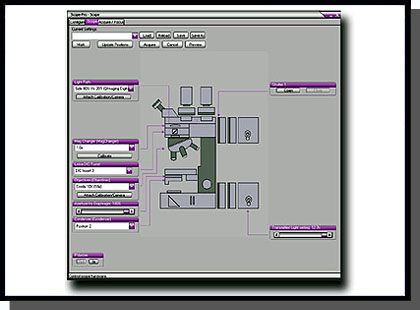
Standard point-and-click functions of the stage control include single step movement in any X, Y, or Z direction. Scope-Pro also controls your motorized filter wheels, shutters, filter sliders, and lamp settings.
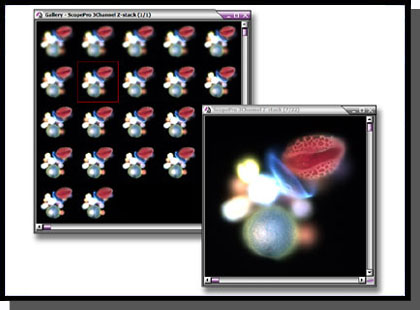
Capture and save Z-stacks of images
Features
Easy Setup
• Control microscope hardware, including several
brands of filter wheels, shutters, stages, and automated
microscopes
• Use repeatable settings for all optical parameters
associated with image capture
• Define the scan origin at any point
• Improved spatial calibration procedures
• Streamlined and simplified user interface
• Support for multiwell plates and multiple microscope
slid holders
• Combine wells in a multiwell plate into experimental
groups
• Incorporate Image-Pro’s 200+ analysis and processing
routines
• Automate repetitive functions and movements by recording
them in an Auto-Pro macro or Visual Basic program*
Use intuitive graphical setup to configure microscopes.
Calibration
• Control devices with or without a calibration • Preserve calibrations across lens changes with new lens files • Use stage movements to make calibrations
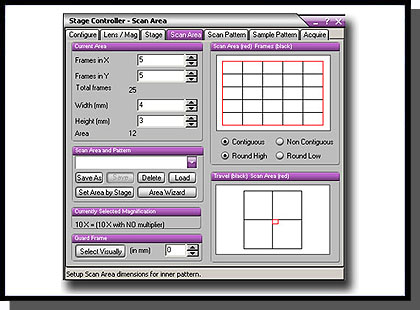
Work with pre-defined multiwell plate patterns for easy setup.
X, Y, and Z Control
• Define the acceptable range of travel
• Capture Z-stacks of images as a stack or sequence
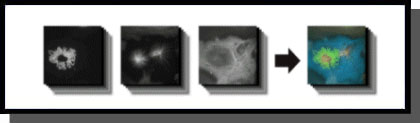
• Generate and create Z-stacks, composite, and extended
depth of field of images for both brightfield and fluorescent
image data
• Measure X, Y, and/or Z distances
• Save X, Y, Z, and time information with the image
• Assemble tiled images into a single high-resolution image
Create, store, and manage scan areas for a variety of imaging conditions.
Streamlined Image Capture
• Easily automate fluorescence and brightfield image
acquisition
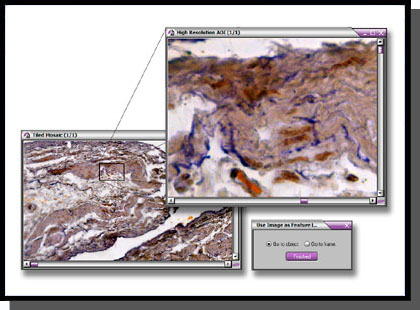
• Capture high-resolution images as a feature map
• Minimize light exposure and reduce photobleaching with
shutter control
• Prompt for non-automated peripheral components
Locate features of interest with image feature map.
* Macro programming tools only available for Image-Pro Plus users.
AFA
Advanced Fluorescence Acquisition-AFA
Automate and Manage Complex Acquisition Modes and Image Sets in Image-Pro Plus Software
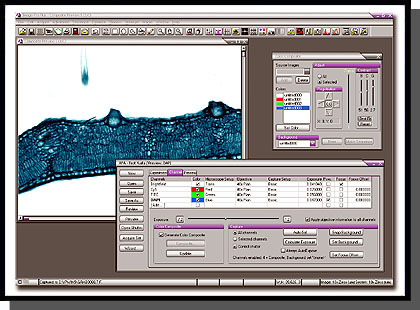
The AFA – Advanced Fluorescence Acquisition plug-in module is for designed research microscopists who need to automate and manage complex acquisition setup parameters, user feedback display, and subsequent sorting into sets for analysis. It allows researchers to manage all combinations of image acquisition modes and image sets including time, channel (wavelength), focus (z-stack) and stage position.
Composite image derived from 16 Z-stack sets from 3 fluorescent channels using AFA *Composite image courtesy of Richard Cole, Wadsworth Center, Albany, NY.
Features
Acquire and Manage Image Datasets in Multiple Dimensions
• Time – Perform time-lapse experiments or automatically calculate the fastest cycle time.
• Channel (wavelength) – Using Scope-Pro’s configuration files, images can be collected from individual
channels. While fluorescence wavelengths are the most common channel type, DIC, RGB, and other modes
can be defined. Descriptive input settings(e.g. Numerical Aperture, Refractive Index and ObjectiveMagnification)
are stored and can be read and used automatically by the SharpStack deconvolution and 3D Constructor Plug-
in Modules.
• Focus (Z-stack) – Return either a single best-focused frame or a full stack for deconvolution and rendering.
Focus drift can be automatically corrected by finding the best starting plane.
• Stage Position – Landmarks can be assigned and used for acquiring data from multiple locations. Alternatively,
a regular pattern(such as a 96-well plate) can be configured. Image-Pro’s tiling tool enables you to
automatically build large images from multiple, smaller location acquisitions.
Configuration Wizard
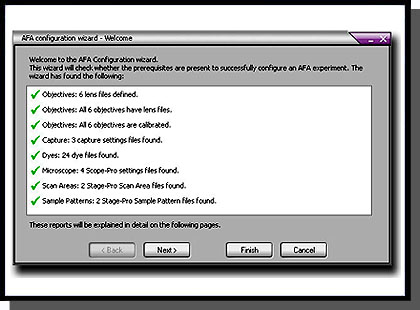
The Configuration Wizard guides you through the necessary setup procedures to ensure the success of your acquisition. AFA will automatically check to make sure it has the necessary settings to acquire your images, including objective lenses, spatial calibrations, camera settings, lookup table information, and Scope-Pro settings.
Manage all combinations of image acquisition modes and datasets.
Exposure Control
Full exposure control is available for each channel. You may even specify composite image to be automatically built as the image set is acquired. Convenient testing options ensure that no time is wasted in method development and an optimum image set is produced. For best results, background correction may be implemented.
Ensure the success of your image acquisition with the Configuration Wizard.
Preview Settings
Multiple image sets can take a long time to collect. You do not want to discover at the end of a run that the parameters were not quite right. The preview function reassures that the desired settings are selected.
Status Update
Monitor the progress of your acquisition with the status display. View the total elapsed time, time left between
cycles, current sample position, wavelength, and Z-position. You may also pause your acquisition and re-focus at the current position. If you pause in the middle of a Z-stack, the partial Z-stack will be discarded and a new stack, centered on the new focus position will be acquired.
Manage Multiple Image Sets
Organizing, extracting, and displaying multiple image sets is a tremendous challenge. The elegant, simple interface of the Set Manager tool unlocks the information within your image sets. Use it to play a movie showing changes of any single dimension. The active data set can be extracted as a separate sequence and stored in .seq or .avi file formats that can be shared with other software for presentation and reporting. The Set Manager provides clear parameter display so you may understand how the data was collected (or assembled from separate sources) and documented. Set information may be stored and recalled via a database or via files.
SharpStack
SharpStack
Image Deconvolution and Image Deblurring Tools for Image-Pro Plus Software
SharpStack and SharpStack Plus remove haze and improve resolution in two-and three-dimensional image stacks using deconvolution and deblurring algorithms.
SharpStack offers Nearest Neighbor, No Neighbor, and Inverse Filter algorithm functions, while SharpStack Plus offers additional 2D and 3D Blind algorithms.
• Enhanced Visualization – Produce image with increased resolution, increased contrast, and improved signal-to-noise ratio.
• Work with Quantitative Data – Retain quantitative accuracy of your data with 2D and 3D blind algorithms.
• Smooth Workflow – The SharpStack Plug-in Modules integrate seamlessly with Image-Pro Plus, 3D Constructor and Image-Pro Discovery.
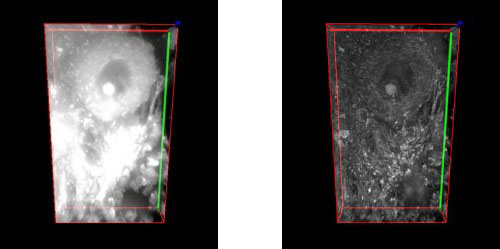
Pig cerebellum image stack deconvolved and rendered (bottom) with SharpStack and 3D Constructor plug-in modules.
Image Deconvolution
Elucidating 3D Structures
Cells and tissues are three-dimensional structures, the observed image at the focal plane contains in-focus information from the plane of interest, as well as out-of-focus contributions from other parts of specimen.As a result, details within the image plane or volume of interest may be obscured. To reveal these structures and produce reliable 3D data, image sharpening techniques such as confocal microscopy and digital deconvolution and are widely employed.
Digital Deconvolution
Digital deconvolution is a mathematical method that restores haze from image planes in an optically sectioned image to its point of origin. The out-of-focus signal may be evaluated as a point-spread-function (PSF) which is applied to reverse the natural effects of blurring within an optical system. The beauty of the technique is that it does not omit or remove any signal being collected by the imaging system. Instead, each photon of light collected is evaluated and restored to its point of origin. The result is an image volume with improved clarity and contrast. The PSF is at the core of the deconvolution process. It determines how light is distorted in an optical system, taking into account such factors as the wavelength(s) of light being collected, the numerical aperture of the objective lens and the refractive index of the immersion media used to couple the microscope objective to the slide. The PSF models how a single point of light reacts to the imaging environment. As light distorts in its travels through the optical path, it assumes an hourglass shape. It is this effect which is then used to evaluate how light distorts at every point within the image volume. Here is how the process works- deconvolution algorithms make the assumption that the raw image volume is a convolution of the estimated volume with the PSF. These methods then make an estimation of what the raw image volume will look like when the PSF is applied to an estimation of how the haze-free volume would appear. The process is iterative, with several estimations being made, each one a closer approximation to the estimated volume. But since it is not possible to arrive at the original volume, constraints are placed on how many iterations the algorithms will make before returning the final deconvolved image. For this reason, the algorithms are referred to as constrained iterative deconvolution.
To simplify the process, the image volumes and PSF are converted into Fourier transforms, a simple method of modeling the data. By multiplying the Fourier transforms of volume and PSF, three dimensional coordinates are re-transformed into an image.
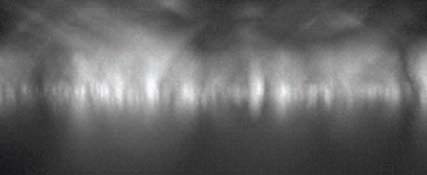
X/Y(left) and X/Y projection(right) of a single point of light blurred in an optical system. This information is used as a PSF to deconvolve images volumes.
Algorithms
Two general methods for haze restoration/removal are included in SharpStack and SharpStack Plus. Not only are deconvolution algorithms included, but also No- and Nearest-Neighbor haze removal (“deblurring”) methods.
Deblurring methods achieve resolution by subtracting light haze from image planes. The result is previously hidden details suddenly becoming apparent. Controls within SharpStack allow you to choose the appropriate level of haze to subtract.
The deconvolution routine used by SharpStack Plus makes use of the Maximum Likelihood Estimation algorithm. A blind PSF models the characteristics of the objective lens used to collect the image and creates a theoretical representation of blurring in the optical system. This blurring function is then used as the basis for restoring signal in the volume. The routine does not omit signal to improve resolution, providing sharp, clear and quantitatively accurate details of previously obscured structures.
Methods Included with SharpStack Plus:
• 3D Blind Deconvolution -Operates on the entire image volume. Photons are not removed so the image remains quantifiable. Uses the Maximum Likelihood Estimation algorithm to achieve resolution.
• 2D Blind Deconvolution -Operates in an iterative manner on a single image plane. This method has better noise suppression and resolution improvement compared to Neighbor-based methods. The 2D Blind method also retains the captured photons rather than removing them, yielding a quantifiable image.
• No Neighbors is a 2D deblurring method applied to a single image plane. Although this method is the fastest, it may not be as representative of the sample as the other methods.
• Nearest Neighbors is a 3D deblurring method which operates on limited Z information (3 slices). It operates by evaluating information from image slices that reside above and below the user-defined image plane of interest.
• Inverse Filter is a 3D deblurring algorithm applied to entire image volumes. It is a one-step, non-iterative approach based on the Wiener filter method. To achieve resolution with this technique, the captured image is divided by the analytic PSF. This method is a fast way to return a qualitative image. It will also return a better image than either the No- or Nearest Neighbor methods, especially along the X/Z and Y/Z axes. This filter can also incorporate a correction for spherical aberrations.
Methods Included with SharpStack and SharpStack Plus:
• No Neighbors
• Nearest Neighbors
• Inverse Filter
Spherical Aberration Correction:
SharpStack and SharpStack Plus contain a method for correcting spherical aberrations.
These effects may appear as haze in an image and result from irregularities in the optical system such as refractive index mismatches (i.e. using an oil immersion lens with a sample mounted in aqueous media) or incorrect coverslip thicknesses.
Figure 3 aFigure 3 cFigure 3 bFigure 3 d
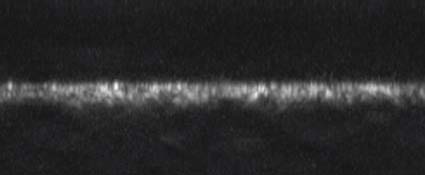
Figure 3: Example of spherically aberrated image: a) XY and b) XZ maximum intensity projection of the original image*, c) XY and d) XZ maximum intensity projection of the deconvolved image with spherical aberration compensation (algorithm provided by AutoQuant Imaging, Inc.).
*Courtesy of Diane Kube, Ph.D., Co-Director CF Imaging Core, CWRU Department of Pediatrics
3D Constructor
3D Rendering and Measurement Tools for Image-Pro Plus Software
3D Constructor is for scientific researchers who wish to explore three-dimensional relationships within and among objects. It is available in the following Image-Pro packages:
3D rendering of a kidney glomerulus Image courtesy of Dr. Brian Matsumoto -Department of Molecular, Cellular and Developmental Biology University of California, Santa Barbara, CA
Overview
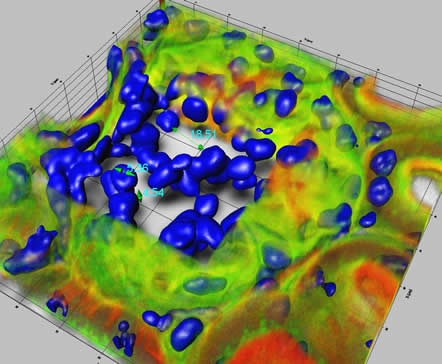
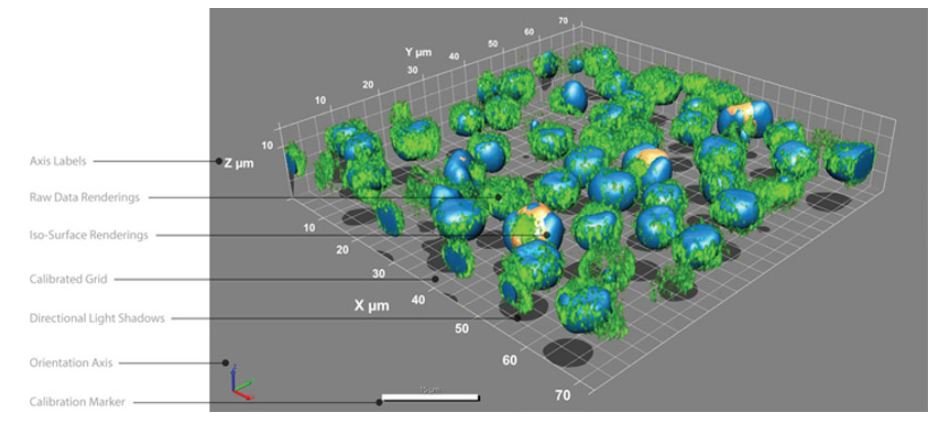
No other analytical imaging product for 3D rendering offers the power and functionality of Image-Pro’s 3D Constructor tool. Gain a better understanding of your images by visualizing, exploring, and applying measurements in three and four dimensions.
Images in Three Dimension
Explore the depth of your images by visualizing and interacting with them in three dimensions.
View volumes from any angle, with adjustable transparency and shading.
Zoom, rotate, and pan image stacks.
Work with calibrated Voxel-size.
Use adjustable lighting controls for enhanced viewing.
Visualize clipping planes in orthogonal and oblique plane-selections.
View internal features of 3D stacks by selecting volume of interest (VOI).
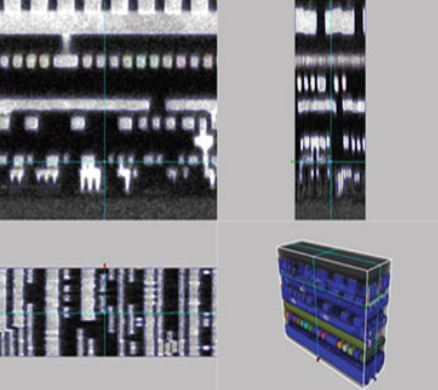
Display synchronized, orthogonal views through an image stack with Stack Slicer.
View multiple iso-surface renderings based on segmentation of selected intensities and colors.
Project a virtual shadow of your image to get a better visual understanding of your object’s 3D shape.
Apply Measurements to 3D Images
Obtain quantifiable data from your three-dimensional image through manual and volume measurements.
Manual Measurements in 3D Constructor:
Obtain quantifiable data from your three-dimensional image through manual and volume measurements.
• Individual point.
• Point-to-Point distance.
• Point-to-Surface distance line.
• Line.
• Angle.
• Point-to-Line distance.
• Circumference of an object bisected by plane.
• Surface distance between two points.
Volume Measurements in 3D Constructor:
• Volume.
• Surface Area.
• Sphericity.
• Feret measurements.
• BOunding box measurements.
• Centroid information.
• Automatic update of measurements from frame-to-fram playback of 4D sequences.
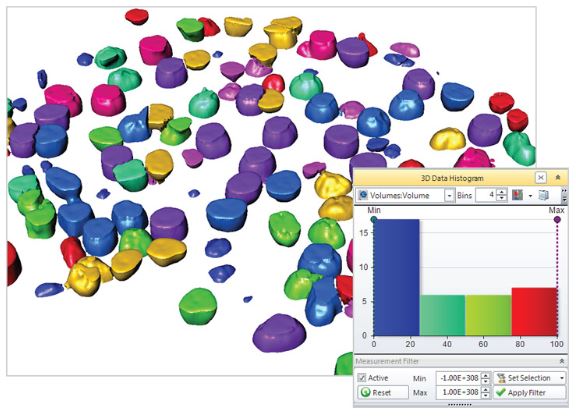
• Set filter ranges for any measurements.
• Clean borders.
Track Objects in a 4D Sequence – NEW
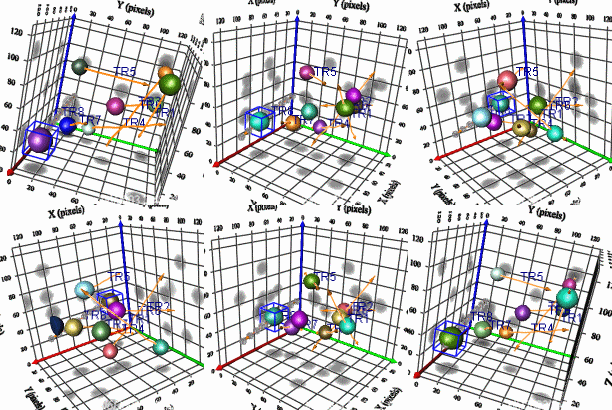
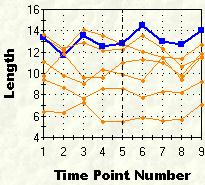
Track and measure the movement of individual objects in a 4D sequence with the 4D tracking feature in 3D Constructor. Choose to automatically find 4D tracks in your image or manually track objects.
Example of 4D object tracking and related tracking data.
Visualize, Trace, and Count Neurons – NEW
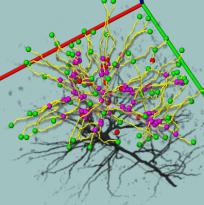
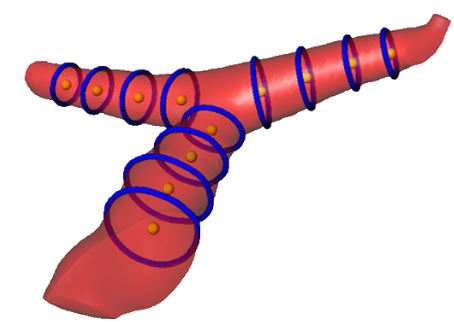
Analyze neurons and other filament structures with the neuron tracing tool in 3D Constructor. Visualize and count the number of branches in a neuron as well as the length and volume of each branch.
Example of neuron analysis using Image-Pro Advanced Microscopy Suite (AMS). Image courtesy of Ling Wang, Department of Neuroscience (Tuszynski Lab) and Brendan Brinkman- Neuroscience Microscopy Shared Facility – University of California, San Diego, CA
Explore Wavelength Overlap with 3D Colocalization
Use Image-Pro’s colocalization tool to indicate which fluorescent regions are to be considered as overlapped, or colocalized. Then activate 3D Constructor to display the colocalized regions in three dimensions.
Create Animations of 3D Images
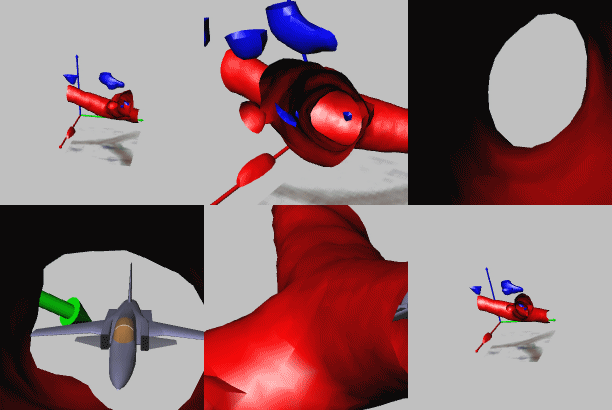
Share your 3D rendered images with others using 3D Constructor’s easy 3D animation creation tools. Create animations with changing transparencies, slide positions, colors, etc. to give others a better understanding of the depth of your 3D image. Save in AVI or multi-frame TIFF or SEQ formats.
3D animation created using 3D Constructor.
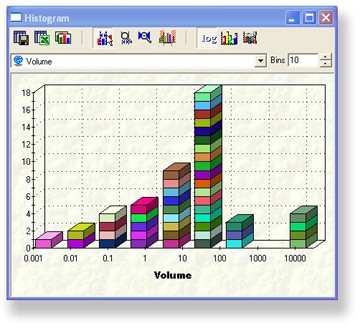
Display and Export Image Data
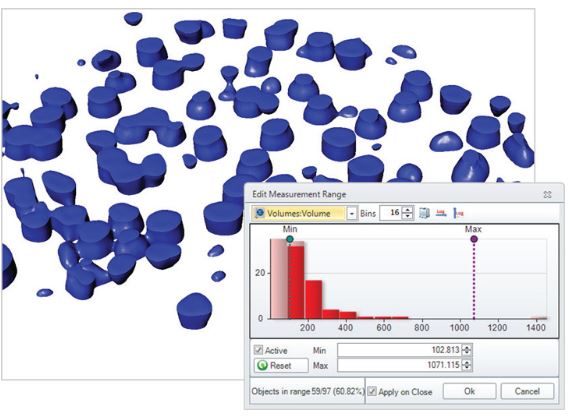
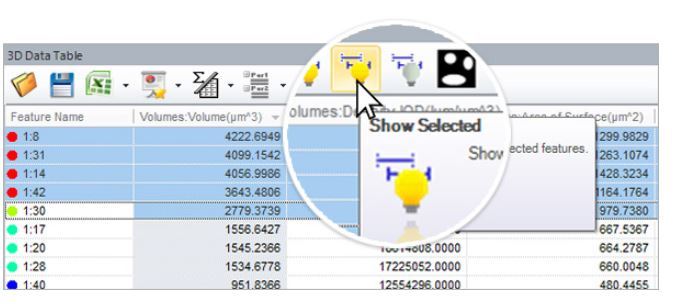
Display and interact with measurement data from individual, histogram, or scatterplot displays. Export 3D measurement data to Microsoft® Excel.
View measurements in histograms and export to Microsoft Excel.
Color-Pro
Color-Pro Plug-in
Accurate Color Rendering for Your Entire Imaging System
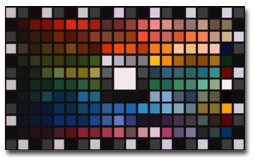
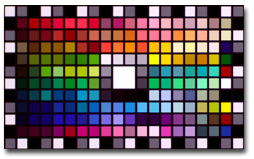
Manage the display of color fidelity of your images within Image-Pro to ensure that you are seeing accurate, consistent colors across your imaging system.
Many analyses are based upon the intensities within each RGB channel for identification, classification and/or quantitation. With Color-Pro color management, you can be sure the color-corrected values will not be compromised.
Key Benefits
• Consistent Color – Feel confident that the colors you see through your microscope eyepiece are the same colors you see on your monitor.
• Better Quantitative Results – Free yourself from relying on personal observation for qualitative interpretation and move towards greater automation and quantitative results. Color-Pro is particularly valuable for pathologists, production facilities, and others who rely heavily on color interpretation to make important decisions.
Before color correctionAfter color correction
Features
Color-Pro Plug-In Module Features
• Every image can have its own color space.
• Allows ICC profiles for input devices (like a camera), display devices, light sources and output devices to be corrected automatically or applied to collected image files in order to maintain accurate color rendering.
• Color profiles associated with images can be saved/loaded in TIFF files.
• Convert images from one color space to another.
• Measure XYZ and L*a*b* colors according to the assigned image color space.
• Includes ICC profiles for cameras supported by the Image-Pro family (Image-Pro Plus, Image-Pro Discovery, and Image-Pro Express)
Color-Pro Plug-in Module Kit Includes:
• Color-Pro Plug-In Module for Image-Pro 5.0 family of products
• Eye-One Monitor Profile Package
GretagMacbeth Eye-One Monitor Profile Package
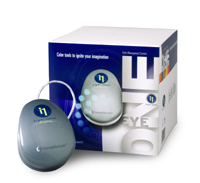
The Eye-One Monitor Profile Package includes a colorimeter and software that enables you to adjust your monitor to display consistent, predictable color. The Eye-One Display compact colorimeter measures the color output of your monitor – both CRT and LCD. The Eye-One Match 2.0 Software works effortlessly with the Eye-One Display to build an ICC profile.
Eye-One Monitor Profile Package
* Profile Package features include:
• USB powered
• Use at multiple workstations at no additional licensing fee
• Includes counterweight for easy use with any CRT or LCD monitor.
• Macintosh and PC compatible – Classic, OS X, Windows 2000, XP Professional
(Image-Pro products are only available for the PC)
시간 간격으로 이미지를 획득하여 시간에 따른 표본 또는 재료의 변화를 조사합니다. 타임 랩스 이미지를 동영상으로 재생하여 움직임 및 기타 활동의 확인이 가능합니다.
시간변화에 따른 개체 이동변위 측정
시간 변화에 따른 개체의 intensity 변화량 측정
Morphology
수동/ 자동 측정을 위한 다양한 필터를 사용하여 이미지 구조를 정확하게 분할합니다
Filter and Enhance
노이즈를 필터링하고 이미지 디테일을 향상시키기 위해 다양한 강화필터와 에지 필터를 사용합니다,
Pseudo-color
Pseudo-color(의사 색상)을 사용하여 회색조 이미지에서 관심있는 부분을 강조 표시합니다. 일반적으로 주변과 구분하기 어려운 특정 강도를 시각적으로 강조하기 위해 사용합니다.
Count and Measure
면적, 둘레, 길이, 진원도, 주축 및 부축, 각도, 중심, 내부홀 및 모집단 밀도등 50여가지가 넘는 수동 및 자동 측정 도구를 사용하여 각 객체를 분석합니다. 특정 객체에 태그를 지정하고 크기 또는 기타 측정 항목별로 정렬가능합니다
Count, Size & Sort Objects using Image-Pro Plus analysis software
Wound Healing Analysis – Image-Pro Plus Software
Classify
사용자 정의 분류 방법을 사용하여 분포 분석을위한 측정 매개 변수를 기반으로 셀, 입자 또는 객체를 클래스로 그룹화합니다
Threshold & Measure Objects잎사귀의 병든 부분의 면적% 측정 가능
Interactive Measurements
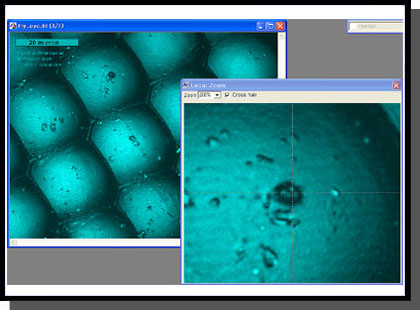
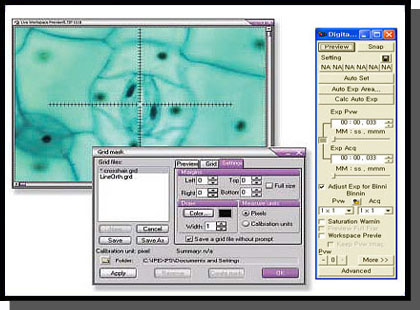
다양한 측정 옵션을 사용하여 이미지에서 수치화 가능한 데이터를 추출이 가능합니다. 계측 도구를 사용하면 가장 적합한 선, 호 및 원을 측정 할 수 있고. 캘리퍼 도구를 사용하여 를 규칙적인 간격 측정이 가능합니다.
엣지를 설정하여 일정 구간의 간격 측정
Co-localization
생물학적 표본에서 공동 위치를 탐지하고 산점도에서 두 데이터 세트 간의 연관성을 그래픽으로 표시합니다.
Automate with Macros
Image-Pro Plus는 편리한 사용자 정의 도구와 내장 매크로 프로그래밍 언어를 제공하여 이미지 분석 절차를 간소화합니다. macro 기록 도구를 사용하여 자주 수행하는 작업을 저장하고 쉽게 편집 할 수 있습니다. Image-Pro Plus에 포함 된 시간 절약형 macro를 사용하거나 사용자가 제공 한 Solutions Zone 사이트에서 다운로드 바랍니다.
TOMORO ScopeEye Auto는 기존의 TOMORO ScopeEye에 자동 입도 분석 (Particle analysis) 기능이 추가된 범용 영상 분석 소프트웨어 입니다.
TOMORO ScopeEYe Auto는 기존의 불편한 입도 분석 (Particle analysis) 절차를 단순화 시켰음에도 더욱 자세한 분석 결과를 도출 할 수 있도록 설계되었습니다.
TOMORO ScopeEye Auto로 기존에 불가능했던 강력한 입도 분석(Particel analysis)을 경험해 보십시오.
Segmentation Method
* 30여가지의 Measure Items
* 개별적인 개체들에 대한 측정 아이템의 추가 삭제 가능
* 항목 선택에 관련한 사용자 지정값의 저장 및 불러오기 기능
* 특성에 따라 그룹화된 측정 아이템
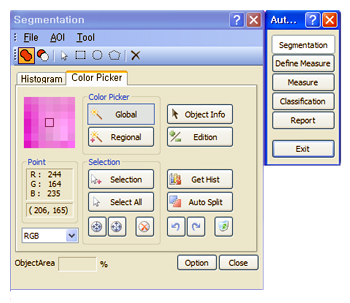
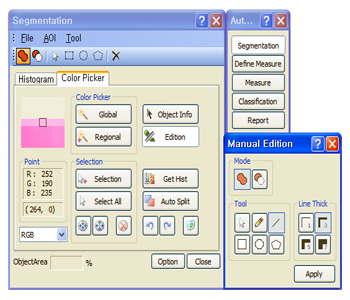
■ Color Picker를 이용한 Segmentation
아래의 도구를 이용하여 향상된 영상 분할을 수행.
*Color Picker
*Magicwand
*Select Object
*Select Total Object
*Set from Histogram
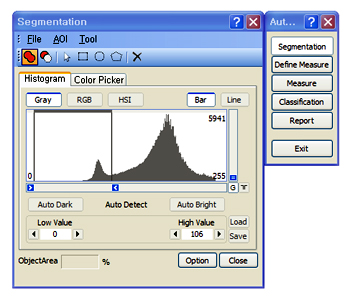
■ Histogram을 이용한 Segmentation(영상 분할)
*Histogram Zoom control
*Low / High Bound control을 이용한 수동 구간선택.
*Low / High Bound display : 스핀 컨트롤을 이용한 미세 조정
*자동 Dark / Bright 영역검출
*선택된 영역에 대해 segmentation(영상 분할) 을 수행합니다.











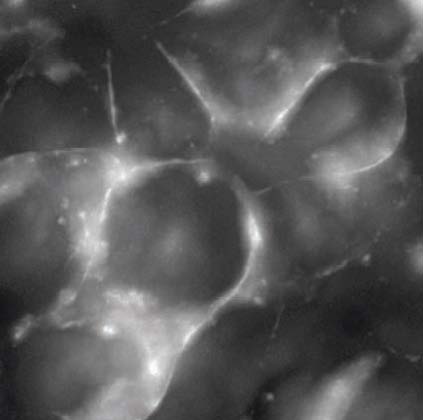
 Cell surface observation without out-of-focus blur